
Features
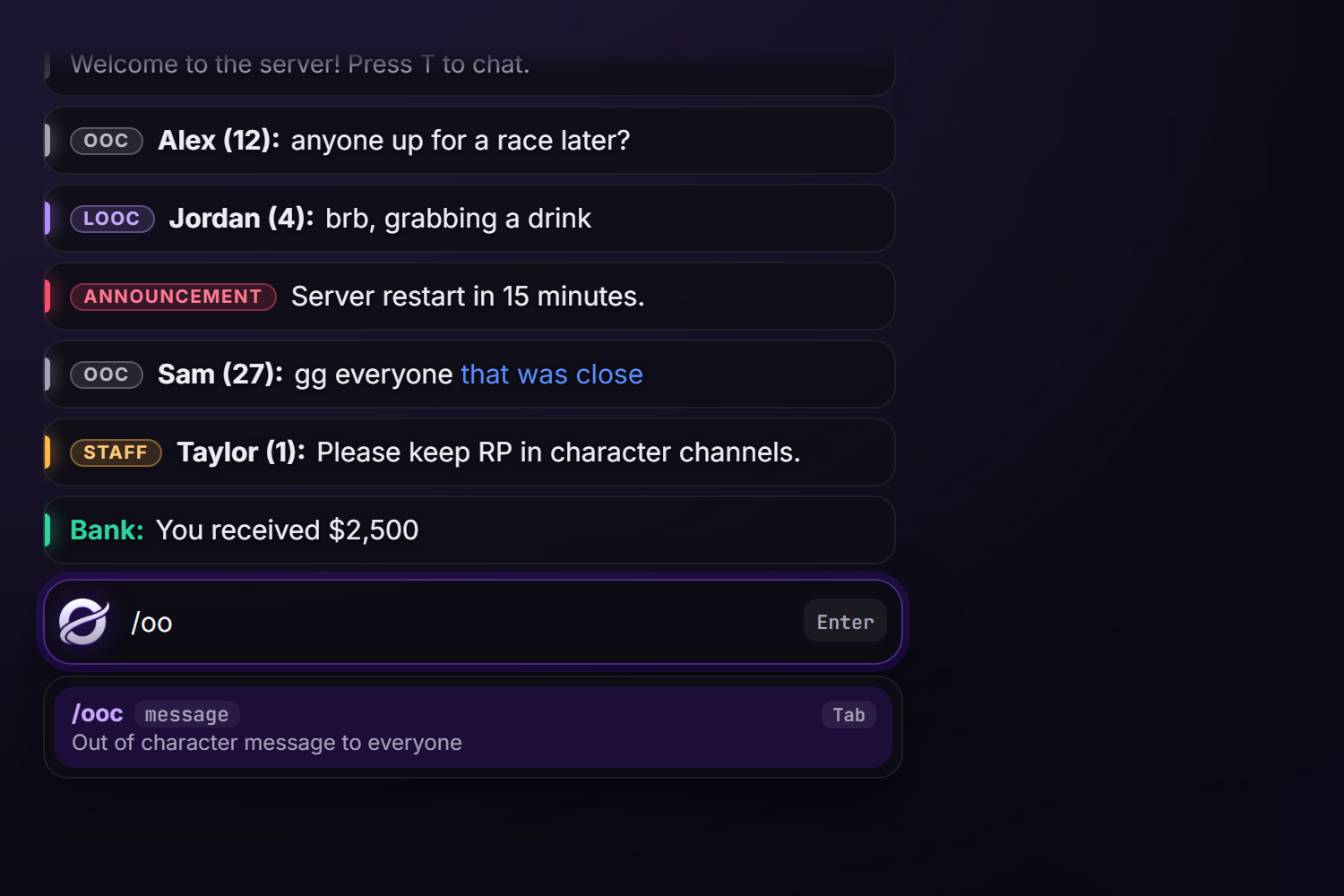
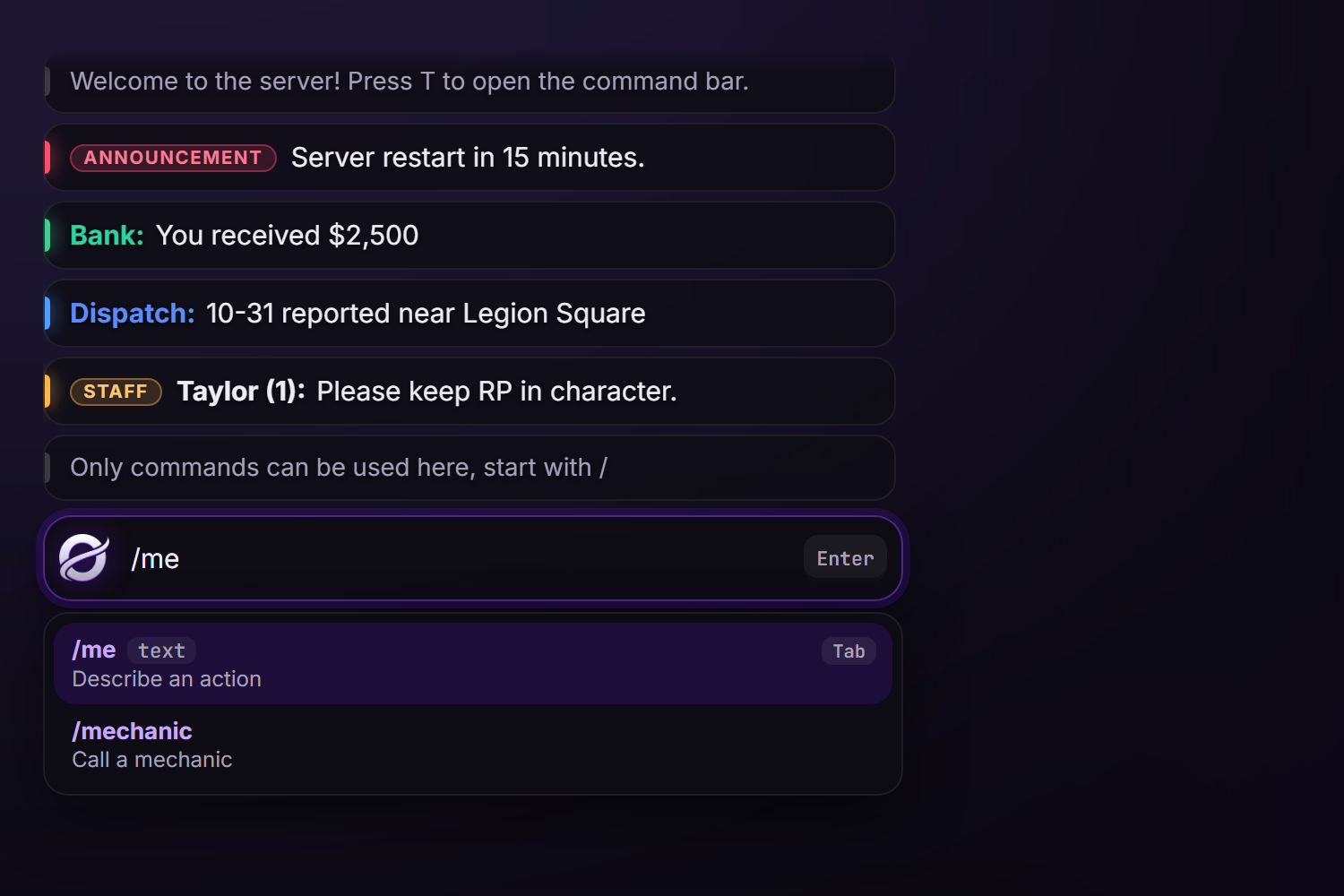
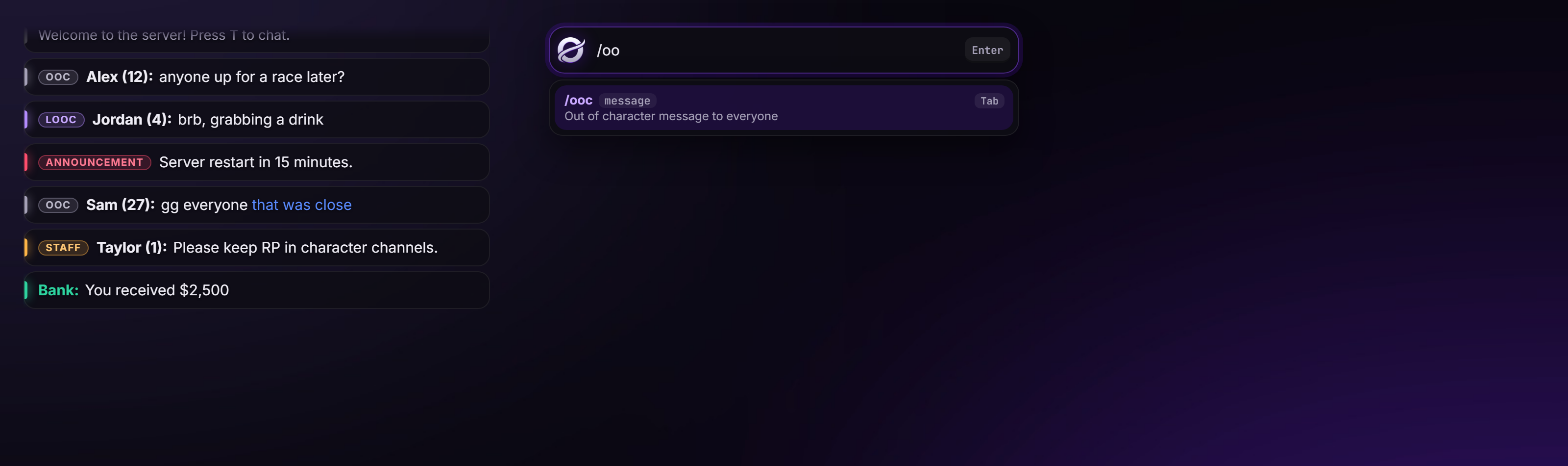
- Chat box or command-only: one option (
Config.ChatBox.enabled). As a chat box, typed text is sent as a chat message. Command-only, the bar only runs/commands. - Chat channels as commands:
/ooc,/looc(nearby only), staff-only/announceand/staff. Add your own with any tag, color, range and staff lock, and turn any command off with one setting. - /me and /do shown above the player's head to people nearby.
- Never gets stuck: tabbing out of the game while the chat is open no longer locks players. The chat takes its focus back, or closes cleanly so it can be opened again.
- Typing stays in the chat: while it's open, no key reaches the game (no getting into a car by typing an F).
- Command suggestions with help text, for every command the player is allowed to use, updated live.
- Message history (Up / Down), Tab to complete a command, Page Up / Down to scroll.
- Character names (ESX, QBCore, Qbox) or FiveM names, with or without server id.
- Anti-spam cooldowns and a word filter.
- Three chat modes on the L key: Visible, Visible when active, Hidden. Saved per player. Opening the chat (T)
always shows it, whatever the mode. Clear it with
/clear; hidden automatically in the pause menu. - Fully compatible with the default chat API:
chat:addMessage,chatMessage, suggestions, templates,^1color codes and theaddMessageexport. - Discord logs for chat messages, staff messages and
/me/do. - Customisable look: position, size, colors, font, input under the chat or at the top of the screen.
- Lightweight: nothing runs while the chat is closed except a pause-menu check twice a second.
- Standalone: no other resources required.
Requirements
Only orynt_bridge (free, from Orynt Development). ESX, QBCore and Qbox are detected automatically (only used for character names and staff groups).
OneSync is recommended for ranged channels (/looc) and /me /do, but not required.
Files
orynt_chat/
├── config.lua            Settings, channels, look (editable)
├── fxmanifest.lua
├── README.md             This file
├── LICENSE.md            Terms of use
├── locales/
│   └── en.lua            All text (editable, copy to translate)
├── shared/
│   └── text.lua          Loads the language
├── client/
│   └── main.lua          Opening, focus fix, /me /do drawing
├── server/
│   ├── sv_config.lua     Discord and console logs (editable, server only)
│   ├── bridge.lua        Character names and staff groups (editable)
│   ├── logs.lua          Discord webhook sender
│   └── main.lua          Channels, filter, cooldowns
└── html/                 The chat window
Every file is open and readable. Files marked editable are the ones meant for configuring.
Installation
- Put the
orynt_chatfolder in yourresourcesfolder. - Remove the default chat and any other chat resource. Orynt Chat replaces the default
chatresource: - Inserver.cfg, replaceensure chatwithensure orynt_bridgeandensure orynt_chatunder it (keep them in the same early spot). - Remove chat themes (e.g.esx_chat_theme) and other chat or/mescripts (e.g.esx_rpchat). - Staff access (for
/announceand/staff): admins in your framework'sadmin,superadminorgodgroup already have it. To give access by ace instead (or as well, and on standalone servers):cfg add_ace group.admin orynt_chat.staff allow - Restart the server. You should see:
[Orynt Chat] Started (chat box)
Resources that list chat as a dependency keep working: Orynt Chat provides chat.
Using the chat
Press T to open it (players can change the key in Settings > Key Bindings > FiveM).
| Key | |
|---|---|
| Enter | Send the message / run the command |
| Esc | Close |
| Tab | Complete the highlighted command |
| Up / Down | Previous messages and commands |
| Page Up / Page Down | Scroll the chat |
| L (chat closed) | Switch mode: Visible → Visible when active → Hidden |
Modes (each player's choice is saved):
| Mode | |
|---|---|
| Visible | The chat is always on screen |
| Visible when active | Shows when a message arrives, then fades out after Config.FadeTime (default mode) |
| Hidden | New messages don't pop up. Press T to open the chat and read them |
Commands (default):
| Command | |
|---|---|
/ooc [message] |
Out of character message to everyone |
/looc [message] |
Out of character message to players within 20 m |
/announce [message] |
Announcement to everyone, no name shown (staff) |
/staff [message] |
Message to everyone with a STAFF tag (staff) |
/me [text] |
An action, shown above your head to people nearby |
/do [text] |
The environment, shown above your head to people nearby |
/clear |
Clear your chat |
With Config.ChatBox.enabled = true, typing text without a / sends it as an OOC message (by default).
With the chat box off (command-only), /ooc and /looc are off too. Any command can be turned off in config.lua.
Configuration (config.lua)
1. Opening and the chat window
| Option | Default | |
|---|---|---|
Config.OpenKey |
'T' |
Default open key (players can rebind it) |
Config.MaxLength |
256 |
Max characters per message |
Config.MaxMessages |
100 |
Messages kept in the window |
Config.FadeTime |
8000 |
Visible when active: ms before the chat fades out (0 = never) |
Config.HideInPauseMenu |
true |
Hide the chat while the pause menu is open |
Config.ModeKey |
'L' |
Default key to switch mode (players can rebind it) |
Config.DefaultMode |
'active' |
Mode for players who haven't picked one: 'visible', 'active' or 'hidden' |
Config.ClearCommand |
'clear' |
Clear command ('' = off) |
2. Chat box
| Option | Default | |
|---|---|---|
Config.ChatBox.enabled |
true |
true = chat box, false = command-only |
Config.ChatBox.tag / color |
'OOC' |
Tag and tag color for typed messages ('' = no tag) |
Config.ChatBox.range |
0.0 |
0 = everyone, otherwise meters |
Config.ChatBox.cooldown |
1000 |
ms between messages per player |
Config.Names.use |
'player' |
'player' = FiveM name, 'character' = character name |
Config.Names.showId |
true |
Add the server id after the name |
Config.AllowPlayerColors |
false |
Let players use ^1...^9 color codes |
3. Chat commands
Config.ChatCommands: each entry is a command that sends a message to a channel.
| Field | |
|---|---|
enabled |
false = turned off (not registered, not suggested) |
needsChatBox |
true = only works while the chat box is on. /ooc and /looc have this, so a command-only server has no OOC chat. Remove it to keep a command either way |
command |
Command name |
tag / color |
Tag shown in front of the message and its color |
range |
0 = everyone, otherwise meters |
staff |
true = staff only (staff skip the cooldown) |
anonymous |
true = the sender's name isn't shown |
help |
Shown in the command suggestions |
Config.StaffAce ('orynt_chat.staff') and Config.StaffGroups ({ 'admin', 'superadmin', 'god' }) decide who is staff.
4. /me and /do
Config.Text3D: range, duration, max length, cooldown, text size and font, and the commands themselves
(enabled, command, color, prefix, suffix, help). Set enabled = false to turn a command off, or copy a
line to add your own (e.g. /think).
5. Word filter
Config.WordFilter: set enabled = true and list words in words. They're replaced with replaceWith in chat
messages and /me /do (not case sensitive).
6. Language and look
| Option | |
|---|---|
Config.Locale |
Language file in locales/ (default 'en') |
Config.UI.position |
'top-left', 'top-right', 'middle-left' or 'middle-right' |
Config.UI.width / height |
Width (% of the screen) and max message list height (% of the screen) |
Config.UI.inputPosition |
'chat' = input under the messages, 'top' = a bar at the top middle |
Config.UI.fontSize / font / radius |
Text size, font and corner rounding |
Config.UI.colors |
Accent, text, hints, message and input backgrounds, system lines |
Server configuration (server/sv_config.lua)
Never sent to players, so webhook links stay private.
| Option | Default | |
|---|---|---|
SvConfig.ConsoleLogs |
false |
Also print every message in the server console |
SvConfig.Logs.enabled |
false |
Send Discord logs |
SvConfig.Logs.webhook |
'' |
Webhook for every log type... |
SvConfig.Logs.webhooks |
all '' |
...unless a type has its own here (chat, staff, text3d) |
SvConfig.Logs.events |
all true |
Turn log types on / off |
SvConfig.Logs.colors |
Embed color per type | |
SvConfig.Logs.username / avatar |
Webhook name and picture | |
SvConfig.Logs.identifiers |
{ 'license', 'discord' } |
Identifiers shown on each log |
Discord logs
- In Discord: Server Settings → Integrations → Webhooks → New Webhook, pick the channel, Copy Webhook URL.
- In
server/sv_config.lua, paste it intoSvConfig.Logs.webhookand setenabled = true. - Optional: a webhook per channel in
webhooks(chat,staff,text3d). ensure orynt_chat.
Keep webhook links private.
For developers
Orynt Chat supports the default chat API, so existing scripts work without changes:
-- server or client
TriggerClientEvent('chat:addMessage', -1, { args = { 'Bank', 'You received $500' }, color = { 62, 207, 142 } })
TriggerClientEvent('chat:addMessage', -1, { tag = 'NEWS', tagColor = '#7018ff', author = 'Weazel', text = 'Breaking news...' })
TriggerClientEvent('chatMessage', -1, 'SYSTEM', { 255, 0, 0 }, 'Hello')
TriggerEvent('chat:addSuggestion', '/mycommand', 'What it does', { { name = 'id', help = 'Player id' } })
exports.orynt_chat:addMessage(-1, { args = { 'Hello everyone' } })   -- server
Typed chat messages trigger the standard server event chatMessage (source, name, message) first. Call
CancelEvent() in a handler to stop the message from being sent.
Translating
All text is in locales/en.lua. Copy it to e.g. locales/de.lua, change Locales['en'] to Locales['de'], translate
it (keep the words in {braces}), set Config.Locale = 'de', then refresh and ensure orynt_chat. Anything left out
falls back to English. Command help texts are in config.lua.
Updating
Replace the resource folder with the new version and start it (refresh, then ensure orynt_chat, or restart the
server). Nothing to copy over:
- Your settings come back by themselves. Every start,
config.lua,server/sv_config.luaand your own translation are copied to the server (its KVP, outside the resource folder). When the new version starts with the files from the download, yours are put back and the resource restarts once to load them. - New options your config doesn't have yet use their defaults, and the console lists them once (the changelog below says what they do).
- Changed any of the open code files (
server/bridge.lua...)? The new version's file is used (it may need it), and yours is saved next to it as<file>.before-updateso you can move your changes over. The console says so. - Keep the resource's name (
orynt_chat): the saved settings belong to it.
To let it restart itself after putting your settings back, add this to server.cfg (without it, the console asks
you to type ensure orynt_chat once):
add_ace resource.orynt_chat command.ensure allow
To go back to the default settings on purpose: type orynt_chat:resetsettings in the server console, put the
files from the download back and restart the resource.
Updating from a version before 1.1.0: those don't save your settings yet, so this one time keep a copy of
your config.lua, server/sv_config.lua and language files, and put them back after replacing the folder. From
1.1.0 on, updates keep them by themselves.
Troubleshooting
| Problem | Fix |
|---|---|
| Two chats on screen / messages twice | Another chat resource is still running: remove ensure chat and chat themes |
/me shows twice or in the wrong style |
Another /me script (e.g. esx_rpchat) is running: remove it |
| T doesn't open the chat | Check Settings > Key Bindings > FiveM > Open chat (a player may have rebound it) |
| The chat doesn't show new messages | The player switched to Hidden: press L to change mode |
"You don't have permission" on /announce |
Add the ace (see Installation) or check your framework group |
| Names show the FiveM name | Set Config.Names.use = 'character' |
/looc reaches everyone or nobody |
Check range in Config.ChatCommands. OneSync gives the most accurate range |
attempt to index a nil value (global 'Locales') |
refresh, then ensure orynt_chat |
Console: Discord log failed (HTTP 4xx) |
The webhook link is wrong or was deleted |
Changelog
- 1.2.0: now runs on orynt_bridge, the free Orynt resource that handles your framework (character names and staff groups) for every Orynt script. Install it once (see Installation); your settings and data stay.
- 1.1.0: new Orynt look (Orynt purple, new emblem, rounded message cards, soft channel tags, a new input bar and command list). Fixed: keys typed in the chat (e.g. F next to a vehicle) no longer reach the game. Updates keep your settings now: replace the folder and your config comes back by itself (see Updating).
- 1.0.0: first release.
License
Free and open: every file is readable and editable. See LICENSE.md. In short: use and change it on your own
servers; don't reupload or resell it; keep the Orynt Development branding.
© Orynt Development