

Features
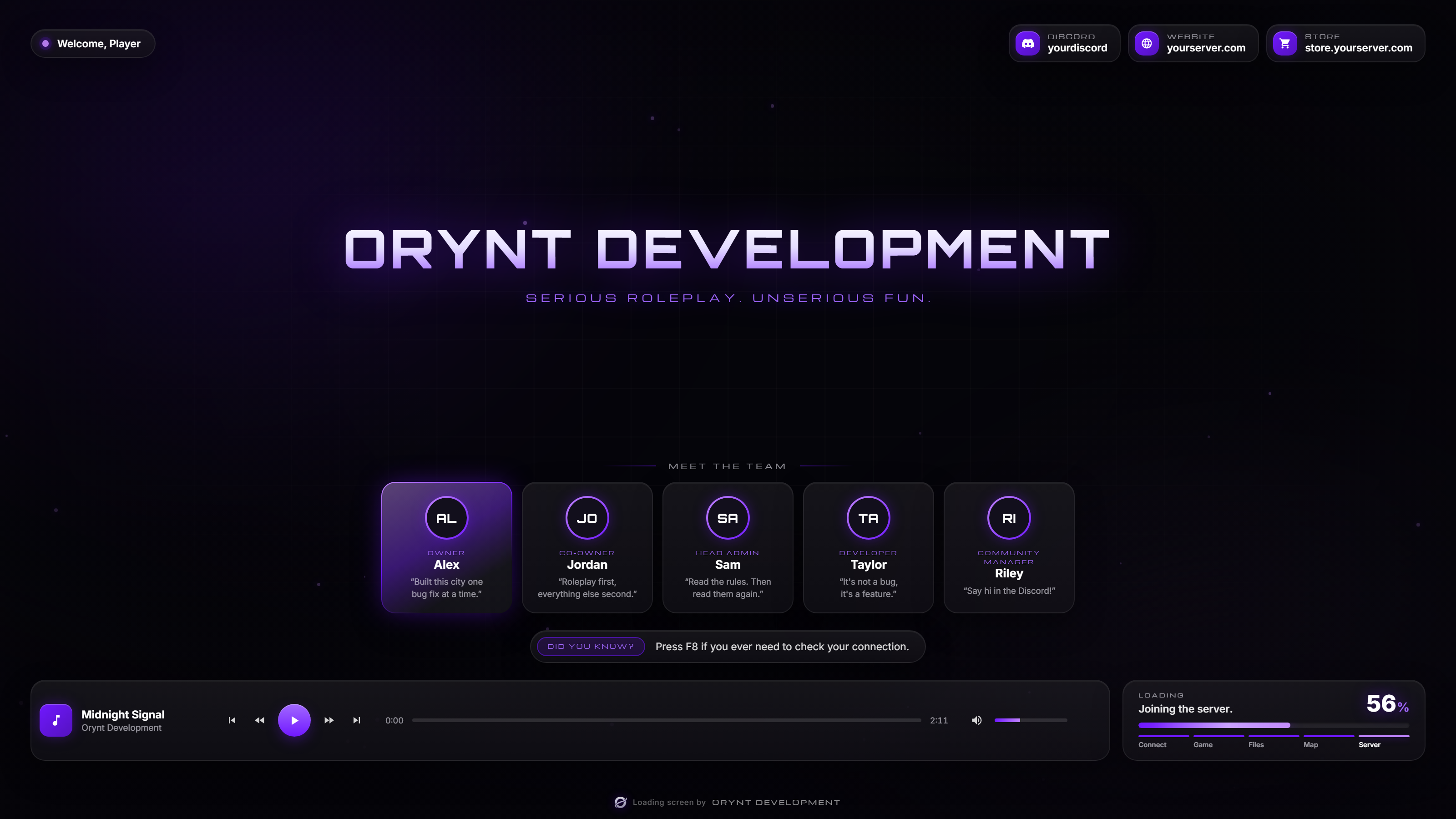
- Your branding: server name (or logo) and tagline in the middle, theme colors, font and corner rounding.
- "Welcome, {name}" with the joining player's FiveM name.
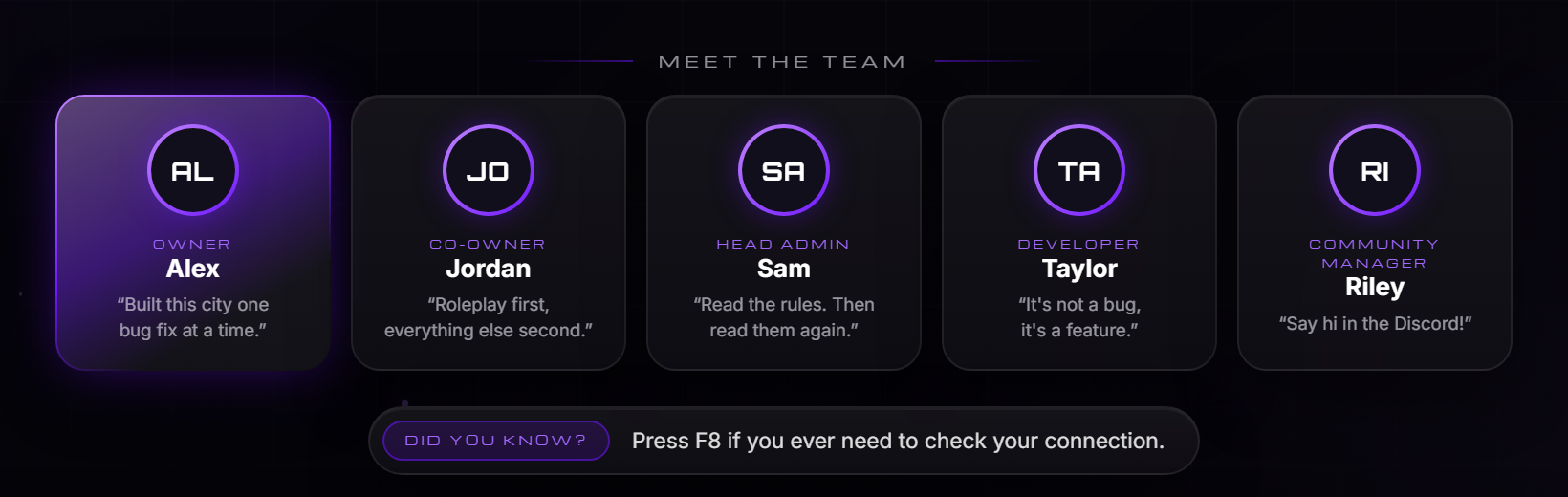
- Staff cards: 1 to 8 members with picture (or initials), role, name and quote. Highlight one, e.g. the owner.
- Rotating tips: "Did you know?" messages that change every few seconds.
- Social links: Discord, website, store, TikTok, YouTube, X, Instagram.
- Real loading bar: follows FiveM's loading and shows the stage ("Loading the map", "Joining the server"...), with markers under the bar that light up stage by stage.
- Music player: playlist, play/pause, previous/next, rewind/fast-forward, seek bar, volume and mute, keyboard shortcuts. Each player's volume is remembered.
- Backgrounds: an mp4 video (local or hosted), an image, or the built-in animated background (no files needed).
- Includes an original royalty-free track ("Midnight Signal") so the music player works out of the box.
- Works on any server: no framework, no dependencies.
- Fully translatable: every text is in
config.js.
Requirements
None. It works with ESX, QBCore, Qbox, standalone or anything else.
Only one loading screen can run on a server: remove or stop any other one (e.g. esx_loadingscreen,
qb-loading).
Files
orynt_loading/
├── fxmanifest.lua
├── server.lua          Passes the player's name to the loading screen
├── README.md
├── LICENSE.md
└── html/
    ├── config.js       All settings (edit this)
    ├── index.html
    ├── style.css
    ├── script.js
    ├── img/            Your logo, staff pictures, background image
    └── media/
        └── music/      Songs (includes midnight-signal.mp3)
Installation
- Put the
orynt_loadingfolder in yourresourcesfolder.Keep the name
orynt_loading. Renaming it is fine for FiveM, but the player's saved volume is stored per resource. - Stop your old loading screen. In
server.cfg, remove itsensureline (e.g.ensure esx_loadingscreen), or delete it from your resources. If it's started by a folder (e.g.ensure [core]), move it out of that folder. - Add to
server.cfg:cfg ensure orynt_loading - Edit
html/config.js(server name, colors, staff, tips, socials, music). - Restart the server and join. Changes to the loading screen show on your next join.
Configuration (html/config.js)
server
| Option | Default | |
|---|---|---|
name |
'Your Server' |
Shown big in the middle when there's no logo |
tagline |
'Serious roleplay. Unserious fun.' |
Line under the name ('' to hide) |
logo |
'' |
'img/logo.png' or a link. Shown instead of the name |
welcome |
true |
"Welcome, {name}" pill top-left |
theme
| Option | Default | |
|---|---|---|
accent |
'#7018ff' |
Main color: buttons, highlights, loading bar (lighter / darker shades are made from it) |
accent2 |
'#c084fc' |
Second color: gradients and the animated background |
text / muted |
white / 62% white | Text colors |
panel |
dark, see-through | Card backgrounds |
font |
Inter | Any font installed or loaded in index.html (the server name uses Orbitron, small labels Michroma) |
radius |
16 |
Corner rounding in px (at 1920 wide) |
background
| Option | Default | |
|---|---|---|
video |
'' |
mp4 file or link |
image |
'' |
Image file or link |
animated |
true |
Animated glow and particles (always used when there's no video or image) |
videoVolume |
0 |
Video sound, relative to the music (0 = silent, 1 = same as music) |
darken |
0.45 |
0 - 1, darkens the video / image |
blur |
0 |
px of blur on the video / image |
socials
A list of { icon, label, value }. Icons: discord, web, store, tiktok, youtube, twitter, instagram.
The loading screen can't open links, so value is the address players should type. Remove a line to hide it.
staff
| Option | |
|---|---|
enabled |
Show the staff cards |
title |
Heading above them ('' to hide) |
members |
1 to 8 of { name, role, quote, pfp, highlight }. No pfp = initials |
tips
| Option | Default | |
|---|---|---|
enabled |
true |
|
title |
'Did you know?' |
The tag in front of each tip |
interval |
8 |
Seconds per tip |
shuffle |
true |
Random order |
list |
5 tips | Your tips |
loading
| Option | Default | |
|---|---|---|
showStage |
true |
"Loading the map"... above the bar |
showPercent |
true |
The percentage |
music
| Option | Default | |
|---|---|---|
enabled |
true |
false hides the player (the loading bar then sits in the middle) |
autoplay |
true |
Start playing straight away |
shuffle |
false |
Random order |
volume |
0.35 |
Starting volume (each player's last volume is remembered) |
seekSeconds |
10 |
Rewind / fast-forward jump |
playlist |
Midnight Signal | { title, artist, src } list |
text
Every word shown on screen, including the loading stages. Translate here. {name} is filled in by the script.
Adding your own media
Local files go in html/img/ or html/media/ and are referenced like 'img/logo.png'.
Links (FiveManage, Discord CDN, your website) work everywhere a path does.
Players download local files before the loading screen appears, so big files make joining slower:
- Keep local images small (under 1 MB).
- Host videos and songs online when they're bigger than about 10 MB, e.g. on FiveManage:
video: 'https://r2.fivemanage.com/xxxx/background.mp4'. - Use mp4 (H.264) for video and mp3 for music.
Only use music you have the rights to. The included track "Midnight Signal" is original and free to use on your server.
The music player
Controls: play/pause, previous, next, rewind, fast-forward, seek bar, volume and mute. The volume also controls the
background video's sound (background.videoVolume).
Keyboard (while the loading screen has focus): Space play/pause, ← → seek, ↑ ↓ volume, N next,
B previous, M mute.
If the game blocks autoplay, a "Click anywhere to start the music" message appears.
Previewing in a browser
Open html/index.html in Chrome or Edge to see your changes without joining. Outside FiveM it plays a fake join so
the loading bar moves, and greets "Player". (Some browsers block local music until you click the page.)
Troubleshooting
| Problem | Fix |
|---|---|
| The old loading screen still shows | Another loading screen is still started: remove its ensure line or move it out of an ensured folder |
| Black screen / nothing changes | Check html/config.js for a missing comma or quote. Open html/index.html in a browser and press F12 to see the error |
| Video doesn't show | Use an mp4 (H.264) and check the path / link. Links must be direct file links |
| "Could not load music" | Check the src paths in the playlist |
| Joining is slow | Host big videos and songs online instead of putting them in the resource |
| No "Welcome, {name}" | server.welcome must be true, and server.lua must be running (it's started with the resource) |
Updating
Replace the resource folder with the new version and restart the server. Your html/config.js comes back by
itself: every start it's copied to the server (its KVP, outside the resource folder), and when the new version
starts with the file from the download, yours is put back and the resource restarts once to load it. New options
in a newer version are listed in the changelog below: copy the ones you want from the download's config.js.
Media you added (html/img/, html/media/) is not copied: keep a copy of your logo, music and video files and put
them back after replacing the folder.
To let it restart itself, add add_ace resource.orynt_loading command.ensure allow to server.cfg.
Updating from a version before 1.1.0: those don't save your settings yet, so this one time keep a copy of
your html/config.js and put it back after replacing the folder.
Changelog
- 1.1.0: new Orynt look: Orynt purple, Orbitron server name, glass cards, a bigger loading card with stage
markers, the new Orynt emblem in the credit.
color-mix()removed so older FiveM builds show every color. Updates keep your settings now: replace the folder and your config comes back by itself (see Updating). - 1.0.0: first release.
License
Free and open: every file is readable and editable. See LICENSE.md. In short: use and change it on your own
servers; don't reupload or resell it; keep the Orynt Development credit.
© Orynt Development