
Features
- In-game Rental Manager (
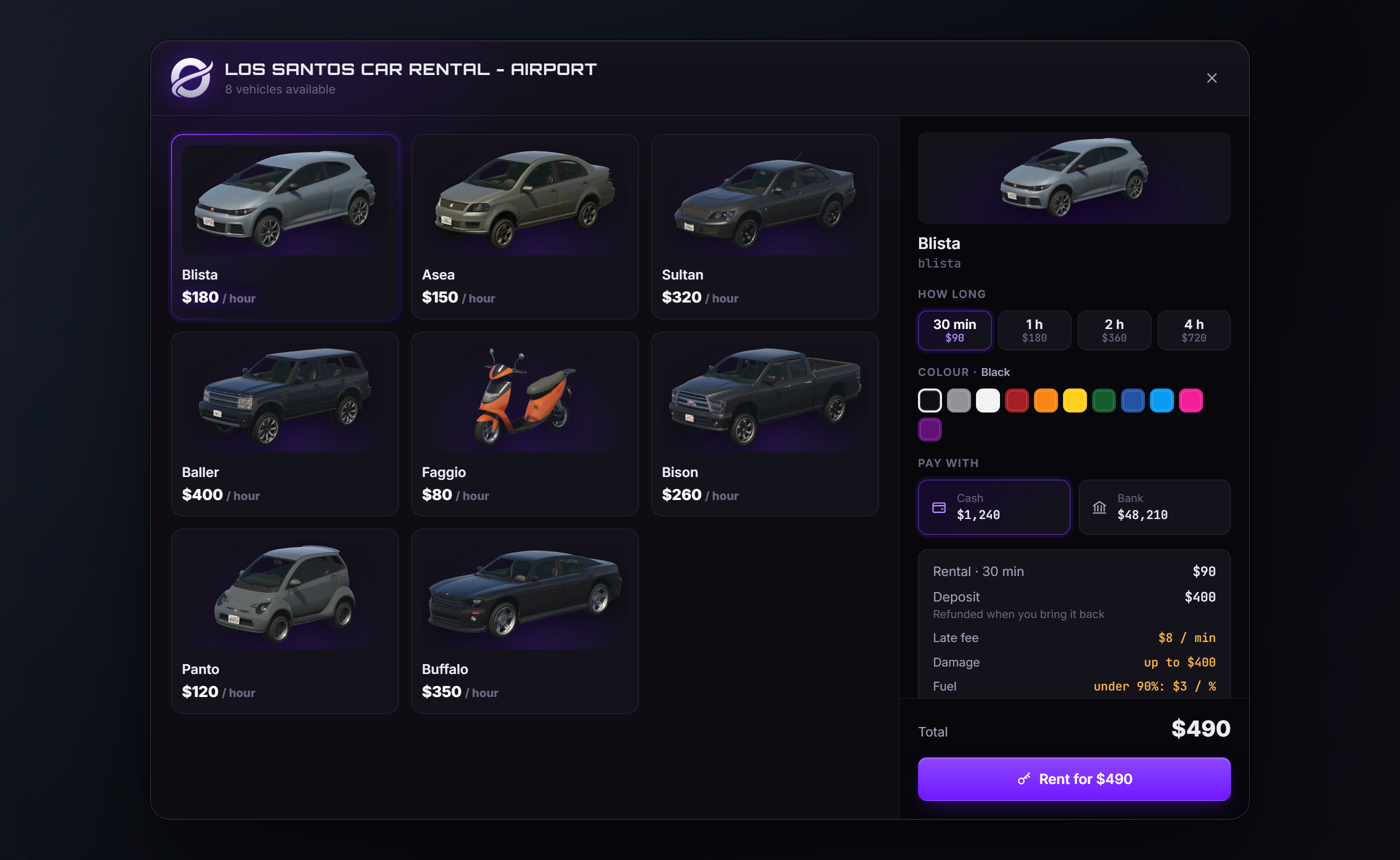
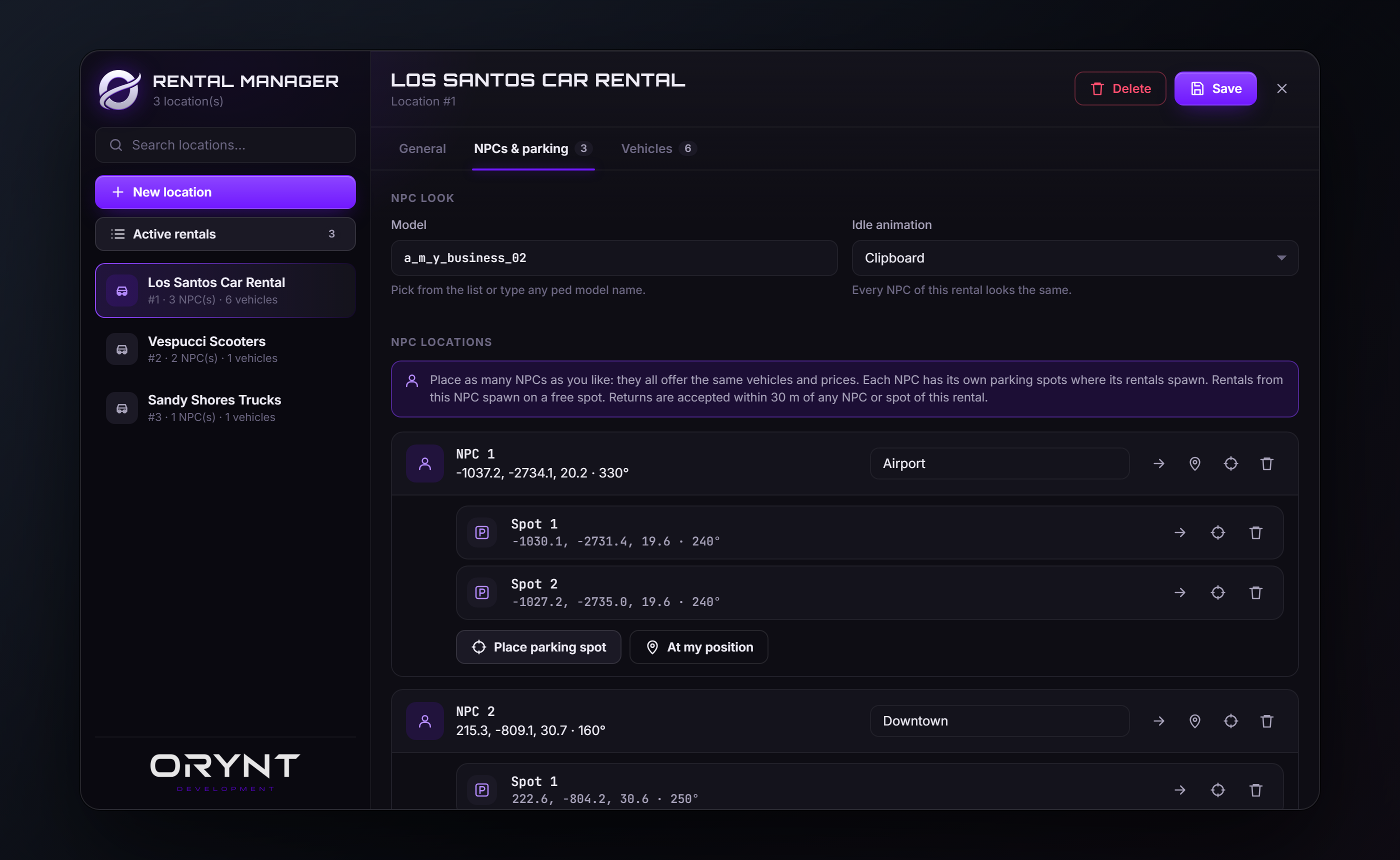
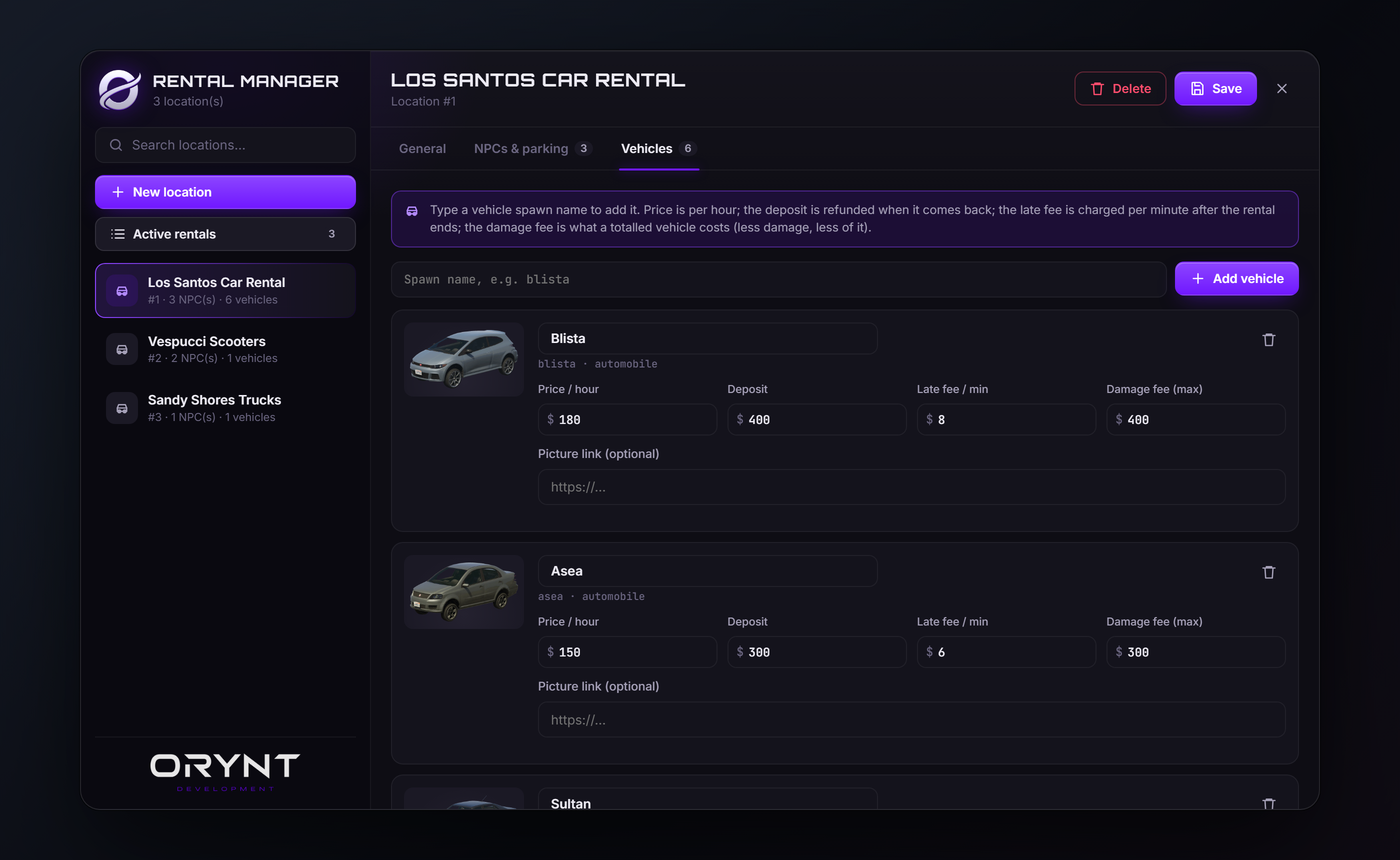
/rentaladmin): create a rental, add vehicles by spawn name with their price per hour, deposit, late fee per minute and an optional picture, then place as many NPCs as you like for it (airport, downtown, beach...), each with its own parking spots, all sharing the same vehicles and prices. Everything is placed in 3D with a see-through preview. No config files, no SQL. - Rental window: vehicle cards with pictures, pick how long (30 min to 4 h by default), pay with cash or bank, see exactly what it costs (rent, refundable deposit, late fee).
- Spawns on a free parking spot with a rental plate (
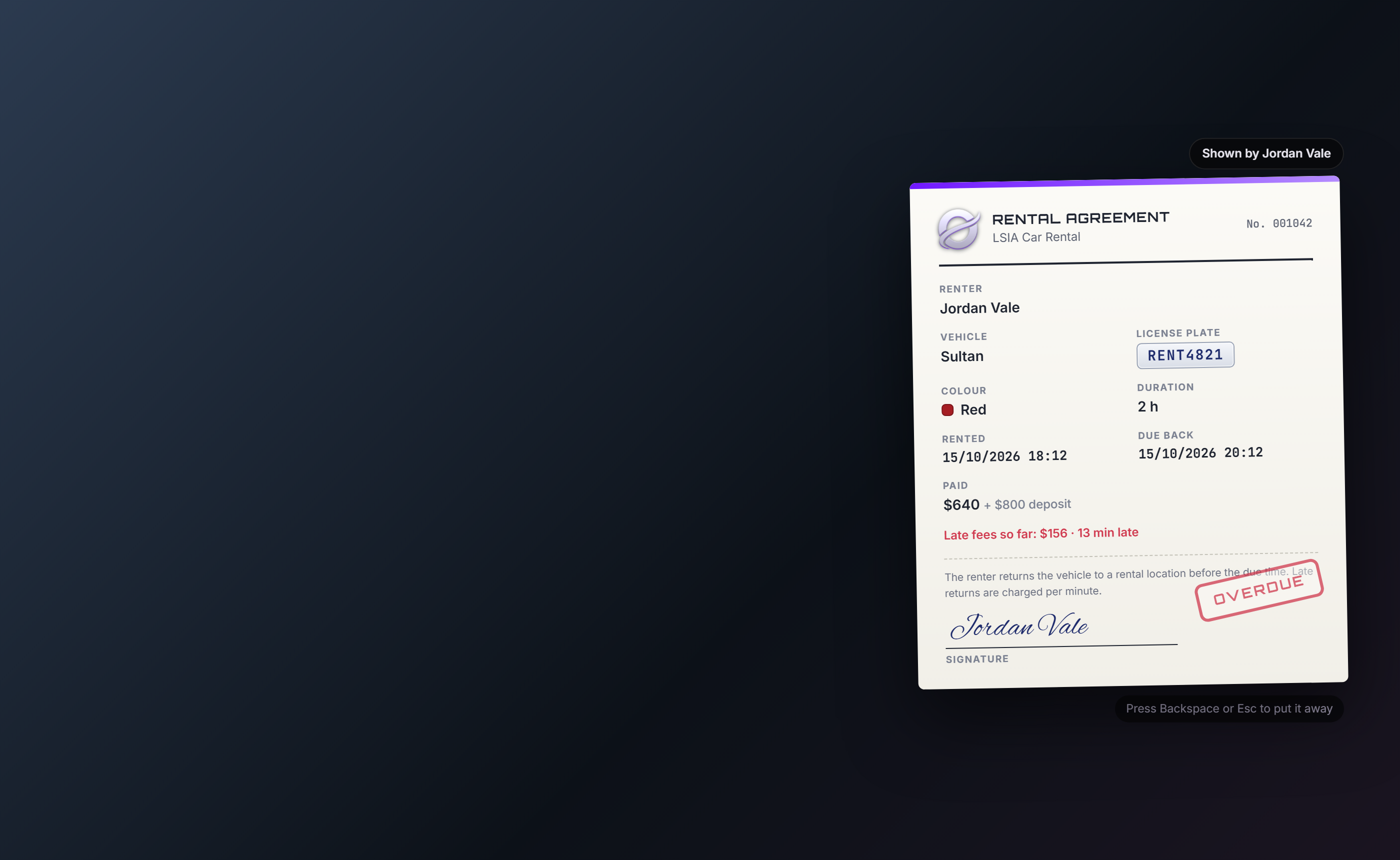
RENT4821), full fuel and the keys, ready for the renter to walk up to. The vehicle is created by the server, so it can't be faked. - Rental Agreement item with the renter, vehicle, plate, rental and return time. Using it shows the agreement to you and the nearest player (police can check it); each closes their own. It always shows the rental's real status: active, overdue, returned, ended or taken back.
- Returning: third eye any rental NPC > Return rental (only shown while you have a rental out), with the
vehicle parked within
Config.ReturnDistanceof that NPC. - Damage and fuel: a damaged vehicle costs part of its damage fee (set per vehicle, e.g. 30% damaged = 30% of it), and one returned with less than 90% fuel pays per % missing. Both come out of the deposit, and players see the rules before they rent.
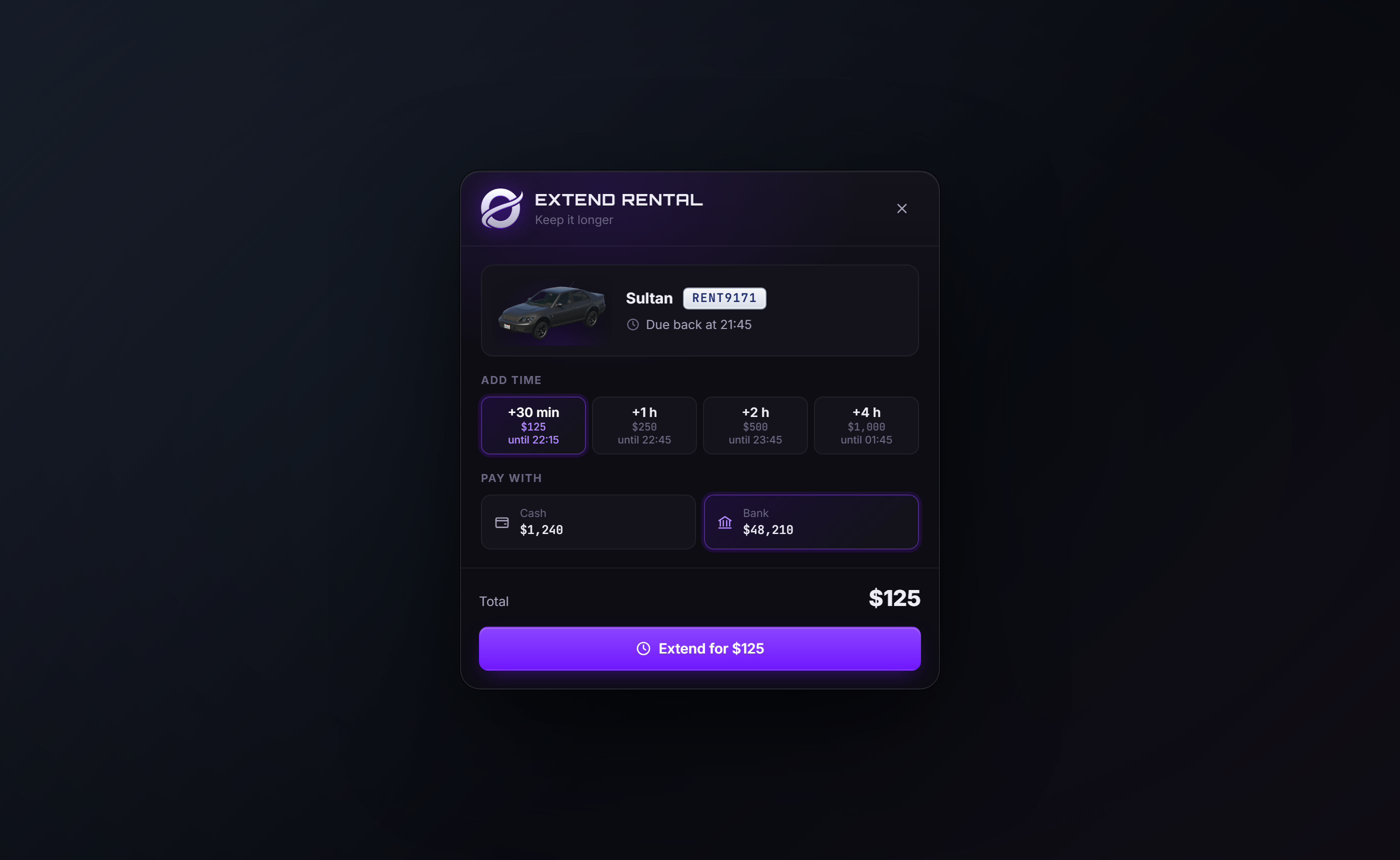
- Extend rental: third eye the NPC > Extend rental to keep the vehicle longer at its hourly price, also when it's already late.
- Pick your colour: players choose the vehicle's colour when renting (from
Config.VehicleColors, black by default). - Deposits and late fees: return it at any rental location (or only where rented) to get the deposit back. Late? Reminders before the end, then a late fee per minute charged every few minutes. Far too late (3 h by default): the vehicle is taken back and the deposit kept.
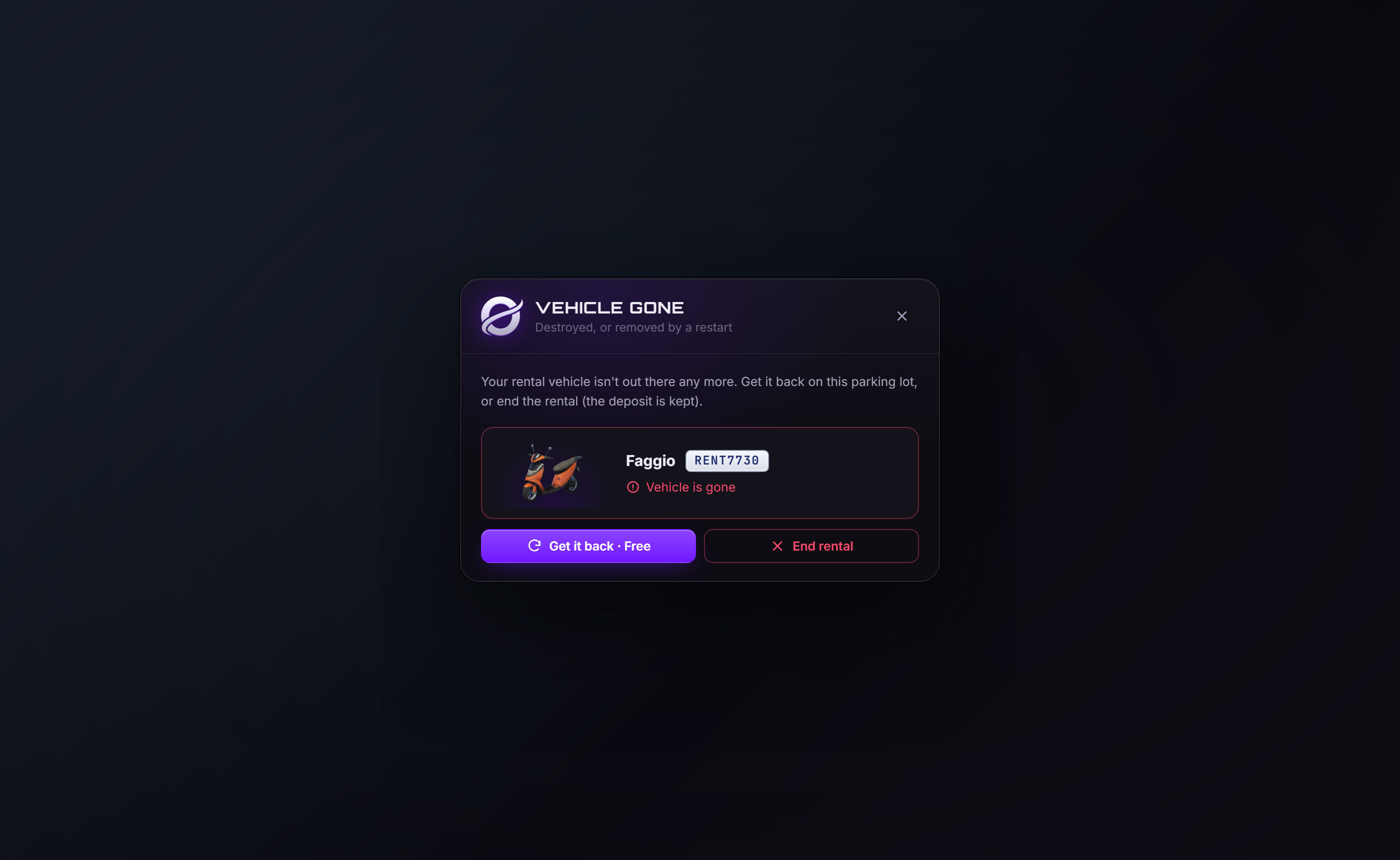
- Rentals survive restarts: the vehicle was destroyed or a restart removed it? Get it back at any rental location (free by default), or end the rental.
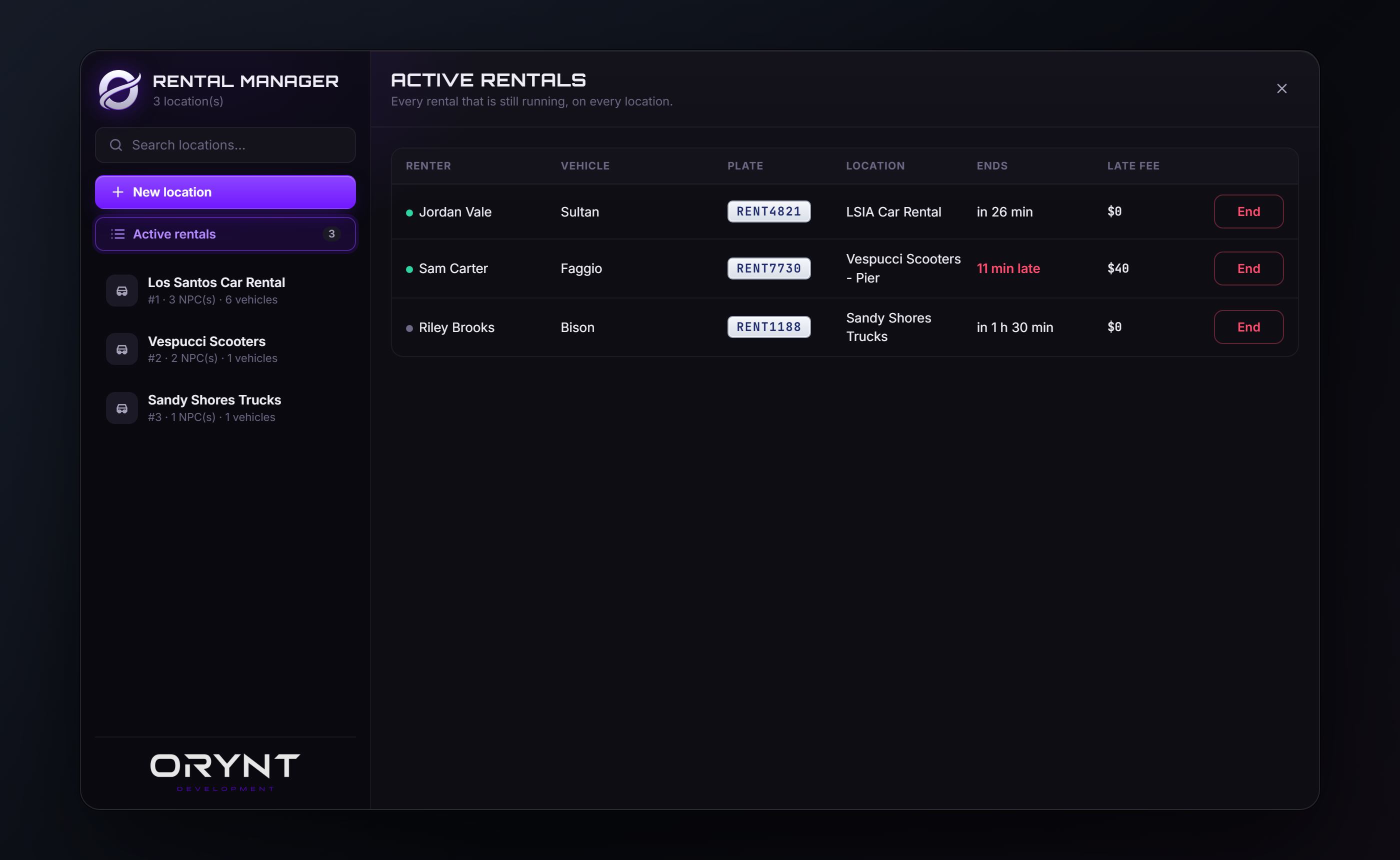
- Active rentals overview for staff, with ending any rental (deposit refunded).
- Works with: ESX, QBCore, Qbox · ox_inventory, qs-inventory, qb-inventory and the others orynt_bridge supports · ox_target, qb-target or a built-in [E] prompt · qbx_vehiclekeys, qb-vehiclekeys, wasabi_carlock, qs-vehiclekeys, cd_garage, Renewed-Vehiclekeys, jaksam's vehicles_keys · ox_fuel, LegacyFuel, cdn-fuel, ps-fuel, lj-fuel, okokGasStation. All detected automatically.
- Discord logs, fully translatable, colors and fonts in the config.
Requirements
| orynt_bridge | Required (free, from Orynt Development): finds your framework, inventory, third eye, keys and fuel |
| ox_lib | Required |
| ESX, QBCore or Qbox | Required (one of them) |
| An inventory with item metadata | Required for the Rental Agreement item: ox_inventory, qs-inventory, qb-inventory and the others orynt_bridge supports (not ESX's own) |
| ox_target / qb-target | Optional (otherwise players walk up and press E) |
| A key script / fuel script | Optional, detected automatically (see Vehicle keys and fuel) |
No database is needed: everything is saved by the server itself.
Files
orynt_rentals/
├── config.lua            Settings (editable)
├── fxmanifest.lua
├── README.md / LICENSE.md
├── locales/en.lua        All text (editable, copy to translate)
├── shared/text.lua       Loads the language
├── client/
│   ├── main.lua          NPCs, blips, the rental window, the agreement, the Rental Manager
│   ├── placement.lua     Placing NPCs and parking spots in 3D
│   ├── target.lua        Third eye: ox_target / qb-target / [E] prompt (editable)
│   └── vehicle.lua       Fuel and client-side keys for the rented vehicle (editable)
├── server/
│   ├── sv_config.lua     Discord and console logs (editable)
│   ├── bridge.lua        ESX / QBCore / Qbox, money and the agreement item (editable)
│   ├── keys.lua          Server-side vehicle keys (editable)
│   ├── storage.lua       Saving locations and rentals
│   ├── logs.lua          Discord webhook sender
│   └── main.lua          Renting, returning, late fees, the Rental Manager
├── html/                 The windows and the agreement
└── install/              The Rental Agreement item for ox_inventory / qb-inventory and its picture
Files marked editable stay readable when the resource is escrowed.
Installation
- Put the
orynt_rentalsfolder in yourresourcesfolder and add toserver.cfg, after ox_lib, your framework and your inventory:cfg ensure orynt_bridge ensure orynt_rentals - The item. ox_inventory: paste
install/ox_inventory/items.luaintoox_inventory/data/items.lua. qb-inventory: pasteinstall/qb-inventory/items.luaintoqb-core/shared/items.lua. Copyinstall/ox_inventory/web/images/rental_agreement.pngto your inventory's image folder. - Staff access. Admins in the
admin,superadminorgodgroup already have it. Or by ace:cfg add_ace group.admin orynt_rentals.admin allow - Restart the server. The console shows:
[Orynt Rentals] framework: esx, inventory: ox_inventory
   [Orynt Rentals] 0 rental location(s), 0 active rental(s), keys: qb-vehiclekeys
Making your first rental location
- Type
/rentaladminand press New location. Give it a name (e.g. LSIA Car Rental), pick cash and / or bank, and set the map blip. - NPCs & parking: pick the NPC look (model and idle animation, the same for every NPC of this rental), then Add NPC location, aim where the NPC should stand, scroll to rotate, E to place (G = your own position). Give it a name if you like (e.g. Airport: players see "Car Rental - Airport").
- Under the NPC: Place parking spot for every spot its rentals spawn on (a see-through car shows the spot). Add
one per vehicle that may be out at the same time: each rental takes the first free spot, so several players can
rent at once. While placing, the spots and NPCs already there show as see-through cars and NPCs with their names,
and a spot closer than 3 m to another one can't be placed. Then add more NPC locations the same way: they all offer the same vehicles
and prices, so you only set those up once. Vehicles are returned at any rental NPC, parked within
Config.ReturnDistance(30 m) of it. - Vehicles: type a spawn name (
blista,faggio...) and press Add vehicle: the game checks the model and fills in its name. Set the price per hour, the deposit, the late fee per minute and the damage fee (what a totalled vehicle costs), and give add-on cars without a picture a picture link. - Save. The NPC and blip appear for everyone straight away.
Admins can also third-eye any rental NPC > Edit rental location.
Renting (players)
Talk to the NPC (third eye or E) > Rent a vehicle:
- Rent: pick a vehicle, how long, its colour, and cash or bank. The total is the rent plus the refundable deposit.
- The vehicle spawns on a free parking spot with full fuel and the keys; the player walks over and gets in. They get the Rental Agreement item.
- Returning: park the vehicle near a rental NPC (within
Config.ReturnDistance, 30 m / 100 ft), get out, and third eye the NPC > Return rental. This option only shows while you have a rental out. The deposit comes back (minus any unpaid late fees) and the agreement is taken back. - Vehicle gone (destroyed, or a restart removed it): Return rental offers Get it back (it's brought to that NPC's parking spots) or End the rental (the deposit is kept).
Deposits and late fees
| Returned in time | The deposit is refunded (to the account the player paid with) |
| Returned late | Late fees are charged per minute late; anything that couldn't be paid is taken from the deposit, the rest is refunded |
| Returned damaged | The vehicle's engine / body damage share of its damage fee (Config.Damage, under 5% is free) |
| Returned with little fuel | Under Config.FuelCharge.freeAbove (90%): perPercent (3) per % missing |
| Charges over the deposit | Late fees, damage and fuel come out of the deposit first; the rest is charged to bank, then cash (Config.ChargeBeyondDeposit) |
| Extend rental | Third eye an NPC > Extend rental: more time at the vehicle's hourly price. Already late? The late fees so far are paid and the new time counts from now |
| Reminders | Config.Warnings minutes before the end (10 and 1 by default), and when it ends |
| Late fee charging | Every Config.LateFees.chargeEvery minutes (5) while the player is online: bank first, then cash |
| Far too late | After Config.LateFees.maxMinutes (180) the rental ends: the vehicle is taken back as soon as nobody is in it and the deposit is kept (0 = never) |
| Vehicle gone | Destroyed, deleted or removed by a restart: Get it back at any rental location (Config.Recover, free by default), or End rental (deposit kept) |
| Staff ending it | Active rentals > End: the vehicle is removed and the deposit refunded (if the renter is online) |
Config.ReturnAnywhere = false only accepts returns at the NPCs of the rental the vehicle came from (any of them).
The Rental Agreement
A rental_agreement item holding the rental's number, renter, vehicle, plate and return time (shown in its
description). Using it shows the agreement on screen for you and the nearest player within
Config.Agreement.showDistance (3 m), while you hold a clipboard. Each player puts it away with Backspace / Esc.
The agreement always shows the rental as it is now: a green Active, a red Overdue with the late fees so far, or
Returned, Ended or Taken back. When the vehicle is returned the agreement is taken back
(Config.Agreement.removeOnReturn).
Vehicle keys and fuel
Keys (Config.Keys = 'auto'): the first running one of qbx_vehiclekeys, wasabi_carlock, jaksam's vehicles_keys
(server side, server/keys.lua) or qb-vehiclekeys, qs-vehiclekeys, cd_garage, Renewed-Vehiclekeys (client side,
client/vehicle.lua). Set it to one of these names to force it, or 'none' (the vehicle is simply unlocked).
Another key script: add a line to one of those two files with its export.
Fuel (Config.Fuel, 100): set through the fuel state bag (ox_fuel), and LegacyFuel, cdn-fuel, ps-fuel,
lj-fuel or okokGasStation when running. Another fuel script: add it in client/vehicle.lua.
Configuration
config.lua:
| Setting | Default | |
|---|---|---|
AdminCommand / AdminAce / AdminGroups |
rentaladmin |
Who can use the Rental Manager |
Framework / Inventory / TargetSystem |
'auto' |
Force one if the console shows the wrong one |
CashAccount / BankAccount / Currency |
'auto', $ |
Money accounts and currency sign |
Durations |
{ 30, 60, 120, 240 } |
Rental times offered, in real minutes |
MaxRentalsPerPlayer |
1 |
Active rentals per character |
Plate |
'RENT' |
Plate start (filled to 8 characters with numbers) |
Fuel / Keys |
100, 'auto' |
Starting fuel, key script |
Agreement |
Item name, take it back on return, show distance | |
Warnings |
{ 10, 1 } |
Reminders before the end (minutes) |
ReturnDistance / ReturnAnywhere |
30, true |
How close (meters, 30 m = 100 ft) the vehicle must be to the NPC to return it; false = only at the NPCs of the rental it came from |
LateFees |
every 5 min, max 180 min | Late fee charging and when a rental is taken back |
Damage / FuelCharge / ChargeBeyondDeposit |
on | Damage and fuel charges on return, and charging past the deposit |
VehicleColors |
Colours players can pick when renting ({} hides the choice) |
|
Recover |
on, free | Getting a gone vehicle back |
KeepDays |
7 |
How long finished rentals are kept (old agreements still show them) |
PedSpawnDistance / InteractDistance / MaxUseDistance |
NPC range, third-eye range, anti-exploit distance | |
DateFormat |
'%d/%m/%Y %H:%M' |
Dates on agreements |
Defaults |
What a new location and a new vehicle start with | |
PedModels / Scenarios / BlipSprites / BlipColors |
Choices in the editor | |
VehicleImages |
FiveM docs | Vehicle pictures ({model}) |
Locale / Notify / TargetIcons / UI |
Language, notifications, icons, colors and fonts |
Discord logs
In server/sv_config.lua (never sent to players): set enabled = true and a webhook, or a webhook per type.
Logged: rentals, returns and ended rentals, late fees and rentals taken back, and Rental Manager changes.
SvConfig.ConsoleLogs = true also prints them in the server console.
Commands and permissions
| Command | Who | |
|---|---|---|
/rentaladmin |
Staff (orynt_rentals.admin ace or Config.AdminGroups) |
Opens the Rental Manager |
Saved data
Locations and rentals are saved in the server's own key-value storage (cache/db), tied to the resource name
orynt_rentals. No SQL. Don't rename the resource folder or the saved data won't be found. Active rentals keep
running through restarts; finished ones are deleted after Config.KeepDays.
Translating
All text is in locales/en.lua. Copy it to e.g. locales/de.lua, change Locales['en'] to Locales['de'],
translate the text (keep the {words} in braces) and set Config.Locale = 'de'. Anything you leave out stays English.
Updating
Replace the resource folder with the new version and start it (refresh, then ensure orynt_rentals, or restart the
server). Nothing to copy over:
- Your settings come back by themselves. Every start,
config.lua,server/sv_config.luaand your own translation are copied to the server (its KVP, outside the resource folder). When the new version starts with the files from the download, yours are put back and the resource restarts once to load them. - New options your config doesn't have yet use their defaults, and the console lists them once (the changelog below says what they do).
- Your locations and active rentals are saved on the server, not in the resource folder: they stay.
- Changed
server/bridge.lua,server/keys.lua,client/target.luaorclient/vehicle.lua? The new version's file is used (it may need it), and yours is saved next to it as<file>.before-updateso you can move your changes over. The console says so. - Keep the resource's name (
orynt_rentals): the saved settings belong to it.
To let it restart itself after putting your settings back, add this to server.cfg (without it, the console asks
you to type ensure orynt_rentals once):
add_ace resource.orynt_rentals command.ensure allow
To go back to the default settings on purpose: type orynt_rentals:resetsettings in the server console, put the
files from the download back and restart the resource.
Updating from a version before 1.1.0: those don't save your settings yet, so this one time keep a copy of
your config.lua, server/sv_config.lua and language files, and put them back after replacing the folder. From
1.1.0 on, updates keep them by themselves.
- 1.2.0: now runs on orynt_bridge, the free Orynt resource that handles your framework, inventory, third eye, keys and fuel. That also adds qs-inventory, codem-inventory, tgiann-inventory, origen_inventory, core_inventory, ps-inventory and lj-inventory, and more key and fuel scripts, for every Orynt script. Install it once (see Installation); your settings and data stay. Extending a rental now updates the agreement item in every inventory with metadata (was ox_inventory only).
- 1.1.0: new Orynt look (Orynt purple, new emblem and wordmark, Orbitron titles, glowing buttons and selection, a purple bar on the rental agreement). Updates keep your settings now: replace the folder and your config comes back by itself (see Updating).
- 1.0.3: vehicle pictures always show the whole vehicle, in every browser (FiveM included); the window's files are versioned so FiveM can't keep showing an old cached copy; the console shows the version on start.
- 1.0.2: vehicle pictures that are nearly square (bikes, scooters, small cars like the Panto) are no longer cut off.
- 1.0.1: vehicle pictures are no longer cut off in FiveM's browser; the rental window is a little taller so the whole price breakdown fits; renting and extending switch to the payment method that can pay (e.g. no cash on you: bank).
- 1.0.0: first release.
Troubleshooting
| Problem | Fix |
|---|---|
| "No inventory with item metadata found" | Use an inventory with item metadata (anything but ESX's own): the agreement needs it |
| The agreement item does nothing | ox_inventory: the item needs client = { export = 'orynt_rentals.useAgreement' } (see install/) |
| No keys | Check the console line keys: .... Set Config.Keys to your key script, or add it in server/keys.lua / client/vehicle.lua |
| "All parking spots are taken" | Add more parking spots, or something is parked on them |
| "Park your ... within 30 m of the rental desk first" | Park closer to the NPC, or raise Config.ReturnDistance |
| No "Return rental" option | It only shows while you have a rental out (after a resource restart, walk away and back once) |
| A vehicle won't spawn | Its spawn name doesn't exist on the server (add-on car not started?). Players are refunded |
| No vehicle pictures | Add-on cars have no picture on the FiveM docs: give them a picture link in the Rental Manager |
/rentaladmin says no permission |
Add the ace above or put yourself in an admin group |
Escrow and license
When escrowed, config.lua, server/sv_config.lua, locales/, server/bridge.lua, server/keys.lua,
client/target.lua, client/vehicle.lua and install/ stay readable. See LICENSE.md for the terms of use.