
Features
- Works with any setup: ESX, QBCore, Qbox or no framework; ox_inventory or the framework's inventory; ox_target, qb-target or a built-in "press E" prompt. All detected automatically.
- IPL or MLO: IPL money washes teleport players in and out through entrances/exits; MLO money washes are part of the map and players simply walk in.
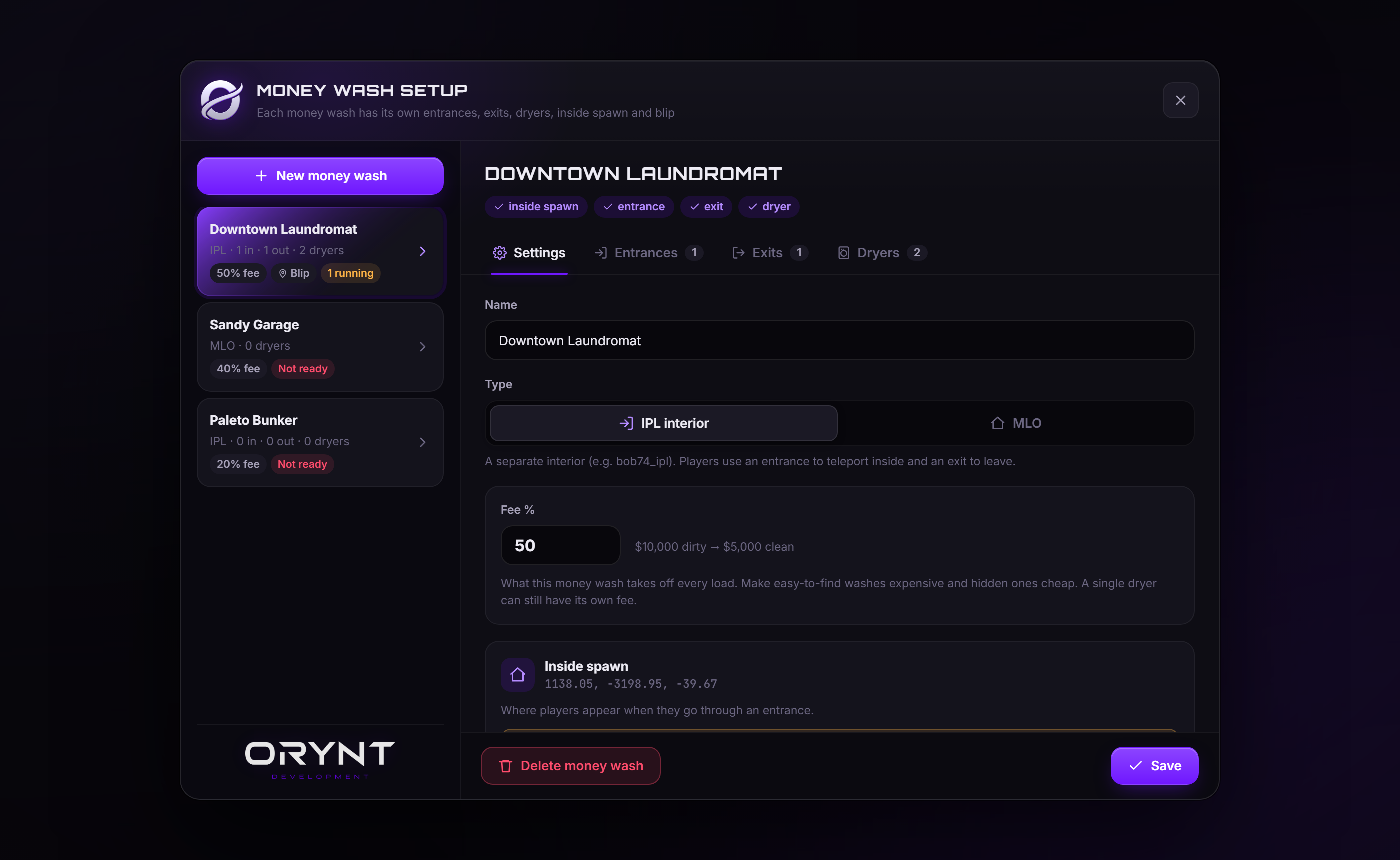
- In-game editor (/washadmin): create money washes, aim to place entrances, exits and dryers, set fees and blips, duplicate dryers down a row, teleport around, finish or empty running loads.
- Per-wash and per-dryer settings: fee, wash speed, max load, and an optional required item (e.g. detergent), used up or not.
- Walk-away washing: a short load animation, then the dryer runs on its own. The owner is notified when it's done.
- Dirty money as an item, an account (ESX black_money) or QBCore marked bills (with change handed back).
- Saved on the server: money washes and running loads survive restarts and disconnects. No database needed.
- Secure: every check happens on the server; the load animation can't be skipped; a load can't be collected twice.
- Discord logs with a separate channel per log type, and optional console logs.
- Fully translatable: every text (players and staff) is in one language file.
- Customisable look: colors, fonts, notification position, third-eye labels and icons.
- Optimised: no loops running while nobody is near a money wash, and no database queries.
Requirements
| Required | Supported | Without one | |
|---|---|---|---|
| Bridge | orynt_bridge (free, from Orynt Development) | Required: finds your framework, inventory and third eye | |
| Library | ox_lib | Required | |
| Framework | ESX, QBCore, Qbox | Works standalone: loads belong to the player's license, money is paid as an item | |
| Inventory | any inventory orynt_bridge supports (ox, qs, codem, tgiann, origen, core, qb, ps, lj) or the framework's own | ox_inventory is needed when there's no framework | |
| Third eye | ox_target, qb-target | Built-in prompt: walk up to the spot and press E | |
| Interiors | bob74_ipl (for the counterfeit cash factory) | Use MLOs or your own interiors |
Files
orynt_moneywash/
├── config.lua            Settings (editable)
├── fxmanifest.lua
├── README.md             This file
├── LICENSE.md            Terms of use
├── locales/
│   └── en.lua            All text players and staff see (editable, copy to translate)
├── shared/
│   └── text.lua          Loads the language
├── client/
│   ├── main.lua          Zones, blips, doors, washing
│   ├── placement.lua     The aim-to-place tool in /washadmin
│   └── target.lua        ox_target / qb-target / built-in prompt (editable)
├── server/
│   ├── sv_config.lua     Discord and console logs (editable, server only)
│   ├── bridge.lua        Framework and inventory support (editable)
│   ├── logs.lua          Discord webhook sender
│   └── main.lua          Money washes, loads, payouts, /washadmin
└── html/                 The washer screen and the /washadmin editor
    ├── index.html
    ├── style.css
    ├── script.js
    └── img/              Orynt logo
Files marked editable stay readable when the resource is escrowed.
Installation
1. Add the resource
Put the orynt_moneywash folder in your resources folder (any sub-folder like [orynt] is fine).
Don't rename the folder. Saved money washes are stored under the resource name. A renamed folder starts empty.
2. Add the dirty money item (if you use an item)
By default players wash the item dirty_money (Config.DirtyMoney). If your server doesn't have it, add it, or
point Config.DirtyMoney at the dirty money you already use (see Money).
ox_inventory - ox_inventory/data/items.lua:
['dirty_money'] = {
    label = 'Dirty Money',
    weight = 0,
    stack = true,
},
QBCore - qb-core/shared/items.lua:
dirty_money = { name = 'dirty_money', label = 'Dirty Money', weight = 0, type = 'item', image = 'dirty_money.png', unique = false, useable = false, shouldClose = false, description = 'Needs washing' },
ESX usually uses the black_money account instead: set
Config.DirtyMoney = { type = 'account', name = 'black_money' } (with ox_inventory, { type = 'item', name = 'black_money' } works too).
3. server.cfg
Start it after ox_lib and your framework, inventory and target resources:
ensure ox_lib
ensure orynt_bridge
ensure es_extended        # or qb-core / qbx_core
ensure ox_inventory       # if you use it
ensure ox_target          # or qb-target
ensure bob74_ipl          # optional, for IPL money washes

ensure orynt_moneywash
4. Permissions
Admins in your framework's admin, superadmin or god group can already use /washadmin. To give access by ace
instead (or as well), add to server.cfg:
add_ace group.admin orynt_moneywash.admin allow
5. Start it
Restart the server, or type in the server console:
refresh
ensure orynt_moneywash
The console should show:
[Orynt MoneyWash] framework: esx, inventory: ox_inventory
with no red errors. Then set up your first money wash.
Setting up your first money wash
Type /washadmin in-game.
MLO money wash (players walk in)
- Click New money wash. Give it a name, pick MLO, set the fee, optionally turn on a blip, and click Create money wash.
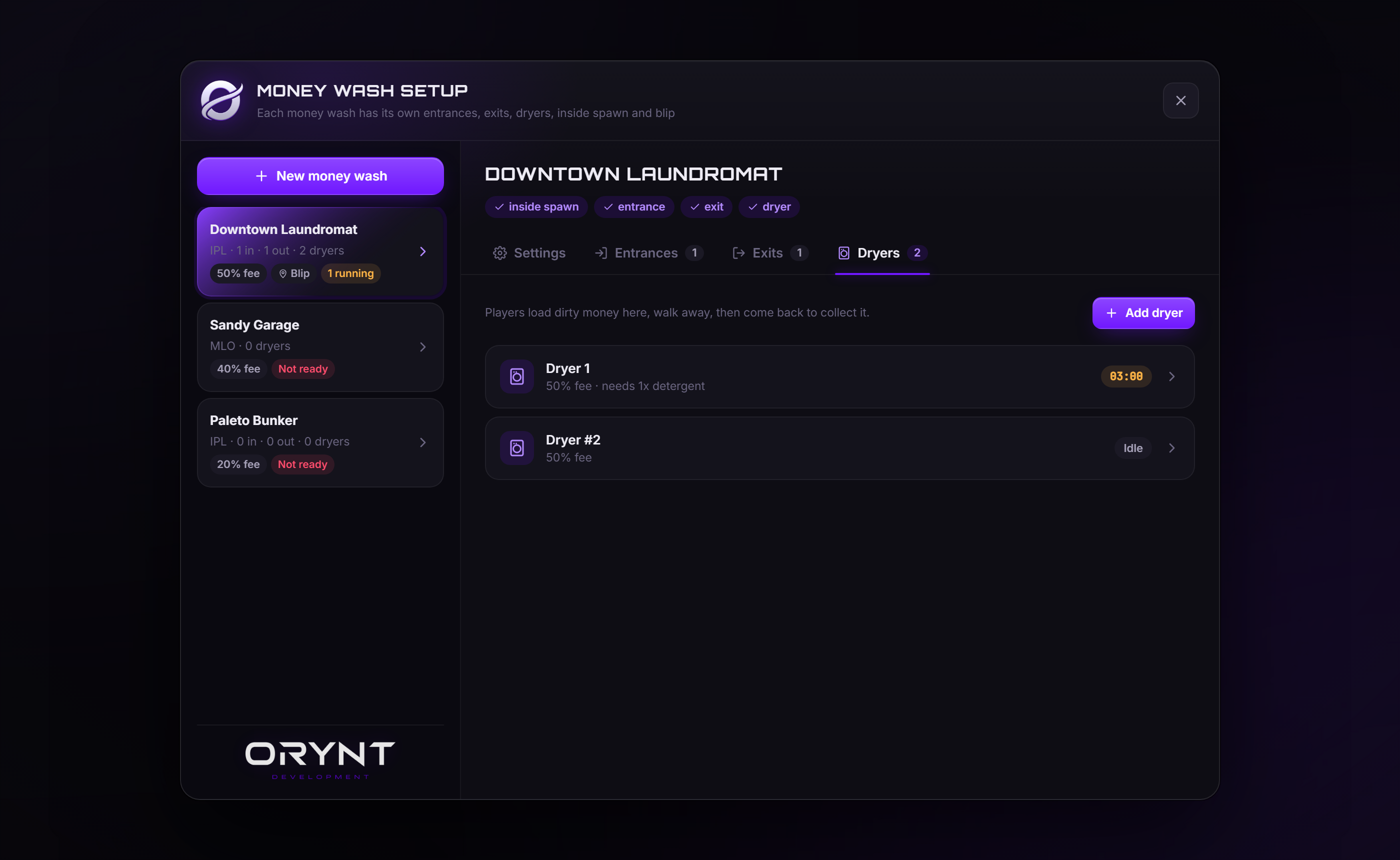
- Go to the MLO. Open the Dryers tab, click Add dryer, then Aim: look at the spot, press E, and click Save.
- Add more dryers the same way, or open a saved dryer and click Duplicate to copy it to the next spot.
Done: the "Not ready" tag disappears from the money wash in the list.
IPL money wash (players teleport in and out)
- Click New money wash. Name it, pick IPL interior, set the fee and blip, and click Create money wash.
- Click Teleport inside (new IPL washes start in the bob74_ipl counterfeit cash factory), stand where players should appear, and click Set to my position. To use a different interior, go there and click Set to my position instead.
- Exits tab: Add exit at the inside door.
- Dryers tab: Add dryer for each dryer.
- Go outside. Entrances tab: Add entrance on the door players should use (as many as you like).
How it plays
- Get inside: walk in (MLO), or third eye the entrance and pick Enter (IPL).
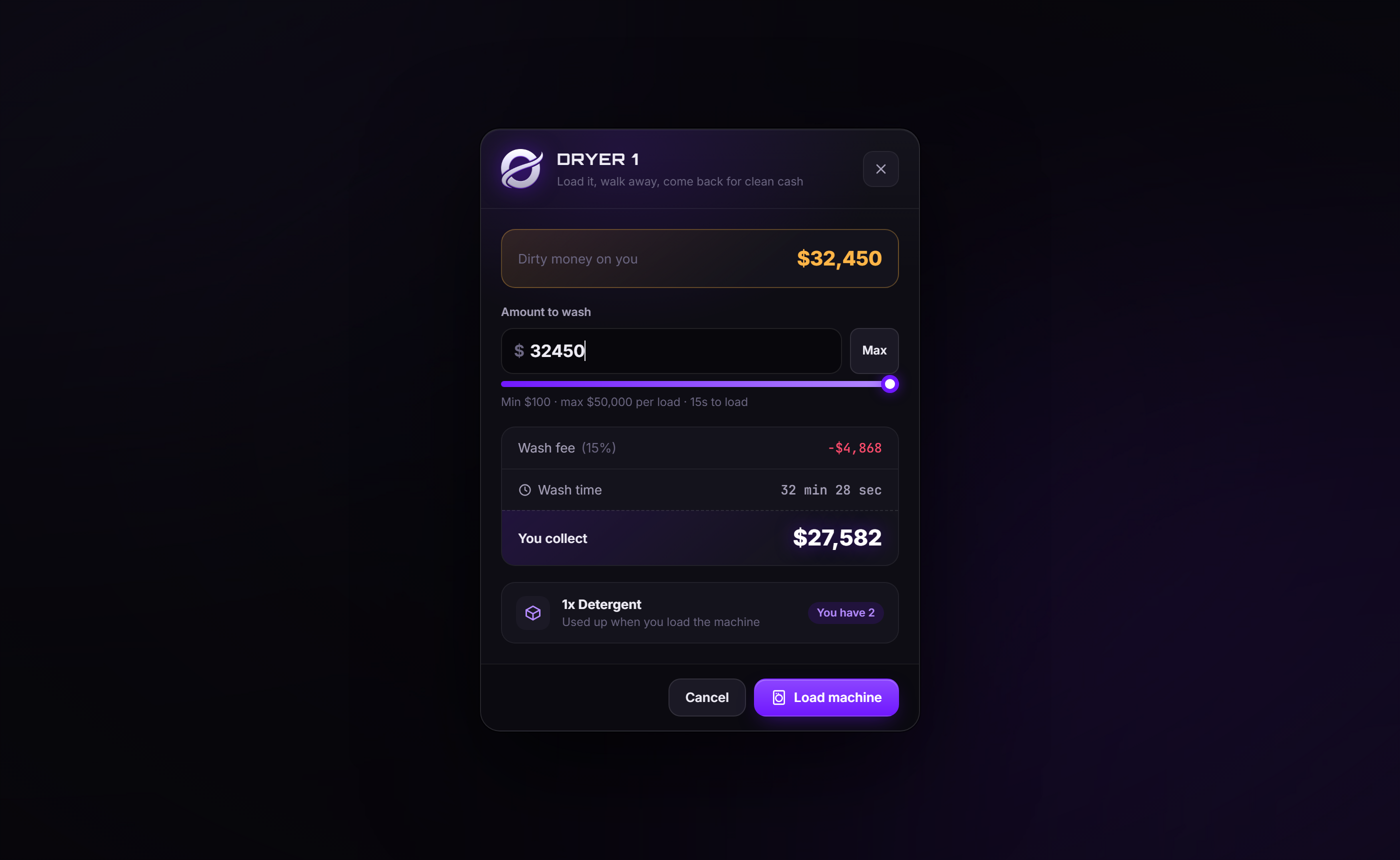
- Third eye a dryer and pick Use washing machine. The screen shows how much dirty money you have, the fee, what you'll collect and how long it takes.
- Click Load machine. The player does a 15-second animation (it can be cancelled, and no money is taken), then is free to go.
- Check machine shows the time left. The owner gets a notification when it's done, even if they left.
- Collect money pays out the clean cash. Only the person who loaded it can collect, unless
Config.AnyoneCanCollectis on. - IPL: leaving through an exit takes players back out the entrance they came in by.
Each player can have one load running at a time (Config.MaxLoadsPerPlayer).
The /washadmin editor
Money washes are listed on the left with their type, fee and status. Click one to open it.
| Setting | |
|---|---|
| Name | Shown on blips and in notifications |
| Type | IPL interior (entrances/exits, teleporting) or MLO (walk in, dryers only). Switching IPL to MLO keeps the old doors but turns them off |
| Fee % | What this money wash takes off every load. A dryer can override it |
| Inside spawn | IPL only: where players appear when they enter |
| Blip | On/off, icon (preset or any sprite id), color and size. IPL: on each entrance. MLO: in the middle of the dryers |
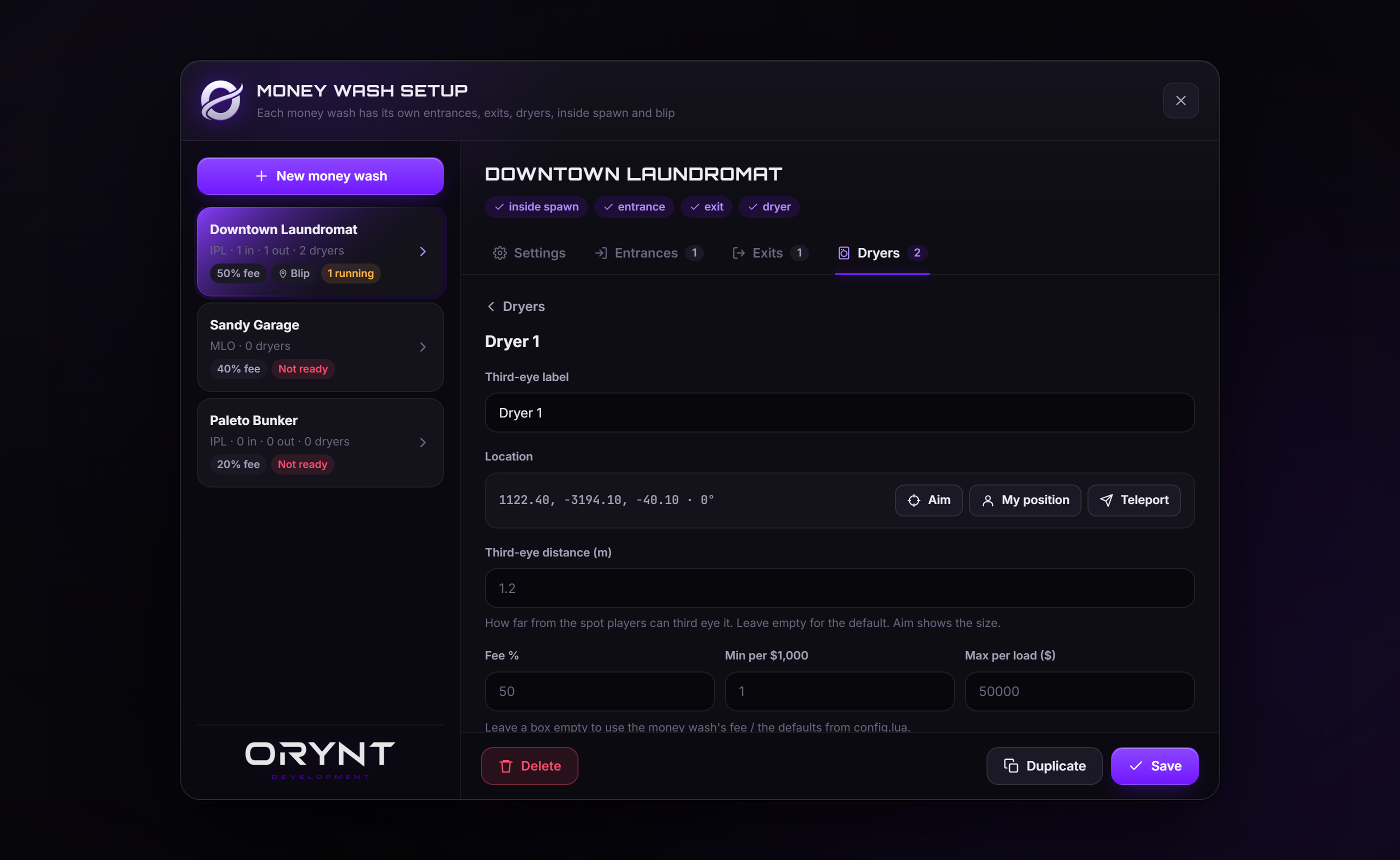
Entrances / Exits / Dryers tabs list that money wash's locations. Each location has:
| Setting | |
|---|---|
| Third-eye label | The option's text (empty = the label from Config.Target) |
| Location | Aim (place where you look), My position, or Teleport to it |
| Third-eye distance | Zone size in meters (empty = Config.TargetRadius) |
| Fee %, Min per $1,000, Max per load | Dryers only: override the money wash / config defaults |
| Require an item | Dryers only: item and amount needed, and whether it's used up |
Placing a location (Aim)
| Key | |
|---|---|
| Look around | Move the spot (the white dot is the exact position, the sphere is the zone) |
| E | Place here |
| Scroll | Rotate (hold Shift for 1° steps) |
| Ctrl + Scroll | Zone size |
| G | Use your own position |
| Backspace / right mouse | Cancel |
Other tools
- Duplicate copies a saved location's settings to a new spot you aim at, and counts numbered labels up ("Dryer 1" → "Dryer 2").
- On a running dryer: Finish now (handy for testing) or Empty (the money is lost).
- Delete asks twice. Deleting a money wash deletes all its locations and anything in its dryers.
Configuration (config.lua)
1. Admin
| Option | Default | |
|---|---|---|
Config.AdminCommand |
'washadmin' |
Command that opens the editor |
Config.AdminAce |
'orynt_moneywash.admin' |
Ace that gives access |
Config.AdminGroups |
{ 'admin', 'superadmin', 'god' } |
Framework groups / permissions that give access |
2. Framework, inventory and third eye
| Option | Default | |
|---|---|---|
Config.Framework |
'auto' |
'esx', 'qbcore', 'qbox' or 'none' |
Config.Inventory |
'auto' |
'ox_inventory' or 'framework' |
Config.TargetSystem |
'auto' |
'ox_target', 'qb-target' or 'none' (built-in E prompt) |
Config.InteractKey |
38 (E) |
Key for the built-in prompt |
3. Money
| Option | Default | |
|---|---|---|
Config.DirtyMoney |
{ type = 'item', name = 'dirty_money' } |
What goes in (see below) |
Config.CleanMoney |
{ type = 'account', name = 'auto' } |
What comes out (see below) |
Config.Currency |
'$' |
Money symbol |
Config.DirtyMoney:
{ type = 'item', name = 'dirty_money' }: an inventory item, $1 each.{ type = 'account', name = 'black_money' }: a framework money account (e.g. ESXblack_money).{ type = 'markedbills', name = 'markedbills' }: QBCore/Qbox marked bills. Each bag'sworthcounts towards the load, and any change is handed back as a new bag.
Config.CleanMoney:
{ type = 'account', name = 'auto' }:moneyon ESX,cashon QBCore/Qbox.{ type = 'item', name = 'money' }: an inventory item. Use this when running without a framework.
4. Washing
| Option | Default | |
|---|---|---|
Config.FeePercent |
20 |
Fee a new money wash starts with (0-100) |
Config.MinutesPer1000 |
1 |
Wash time per $1,000 ($5,000 = 5 min). Never under 10 seconds |
Config.MinAmount |
100 |
Smallest load |
Config.MaxAmount |
50000 |
Biggest load |
Config.LoadTime |
15 |
Seconds of load animation |
Config.LoadAnim |
{ scenario = 'PROP_HUMAN_BUM_BIN' } |
Any ox_lib progress animation (scenario, or dict + clip) |
Config.MaxLoadsPerPlayer |
1 |
Dryers one player can run at once (0 = no limit) |
Config.AnyoneCanCollect |
false |
true lets anyone collect a finished load (players can rob each other) |
5. Interaction zones
| Option | Default | |
|---|---|---|
Config.TargetRadius |
0.8 |
Default zone size in meters |
Config.MaxUseDistance |
5.0 |
How close the server requires players to be (at least zone size + 2 m) |
Config.Debug |
false |
Show the zones as spheres |
6. IPL interior
| Option | Default | |
|---|---|---|
Config.Interior.loadIpl |
true |
Load the bob74_ipl counterfeit cash factory with its props |
Config.Interior.spawn |
counterfeit factory | Inside spawn a new IPL money wash starts with |
Config.Interior.instances |
true |
Each IPL money wash gets its own instance: players in the same money wash see each other, players in different ones don't. false = everyone shares the room |
7. Blips
| Option | |
|---|---|
Config.Blip |
The blip a new money wash starts with (enabled, sprite, color, scale) |
Config.BlipSprites |
Icons offered in the editor (sprite list) |
Config.BlipColors |
Colors offered in the editor (hex is only for the swatch) |
8. Look and feel
| Option | |
|---|---|
Config.Locale |
Language file in locales/ (default 'en') |
Config.Notify |
Notification title and position |
Config.Target |
Third-eye label and Font Awesome icon for use / collect / check / enter / leave |
Config.PlacementColor |
Color of the placing sphere { r, g, b, alpha } |
Config.UI.colors |
Screen colors (any CSS color). Hover and border shades are worked out from them |
Config.UI.backdropOpacity |
How much the game is dimmed behind the screens (0-1) |
Config.UI.font / headingFont / monoFont |
Fonts for text, titles and numbers |
Config.UI.radius |
Corner rounding in px |
Server configuration (server/sv_config.lua)
This file is never sent to players, so webhook links stay private.
| Option | Default | |
|---|---|---|
SvConfig.ConsoleLogs |
false |
Also print loads, collects and /washadmin changes in the server console |
SvConfig.Logs.enabled |
false |
Send Discord logs |
SvConfig.Logs.webhook |
'' |
Webhook for every log type... |
SvConfig.Logs.webhooks |
all '' |
...unless a type has its own here (load, collect, admin, exploit) |
SvConfig.Logs.events |
all true |
Turn log types on/off |
SvConfig.Logs.colors |
Embed color per type | |
SvConfig.Logs.username / avatar |
Webhook name and picture | |
SvConfig.Logs.identifiers |
{ 'license', 'discord' } |
Identifiers shown: license, discord, steam, fivem, xbl, live, ip |
Discord logs
- In Discord: Server Settings → Integrations → Webhooks → New Webhook, pick the channel, Copy Webhook URL.
- In
server/sv_config.lua, paste it intoSvConfig.Logs.webhookand setenabled = true. - Optional: make a webhook per channel and paste them into
webhooks(load,collect,admin,exploit). ensure orynt_moneywash.
| Log | When |
|---|---|
| load | A player loads a dryer: location, dirty money, fee, clean money, wash time |
| collect | A player collects: location, amounts. Flagged when someone collects another player's load |
| admin | /washadmin: money washes and locations created, edited or deleted, inside spawn moved, dryers finished or emptied |
| exploit | Suspicious actions, e.g. finishing the load animation too fast |
Every log shows the player's name, server id and the identifiers you chose. Logs are sent one at a time and wait when Discord rate-limits, so none are lost. Keep webhook links private: anyone with one can post in that channel.
Translating
Every text players and staff see (messages, the washer screen, the /washadmin editor and Discord logs) is in
locales/en.lua.
- Copy
locales/en.luato e.g.locales/de.lua. - At the top, change
Locales['en']toLocales['de']. - Translate the text. Keep the words in
{braces}: the script fills them in. - Set
Config.Locale = 'de'andensure orynt_moneywash(afterrefresh, since it's a new file).
Anything left out falls back to English.
Commands and permissions
| Command | Who | |
|---|---|---|
/washadmin |
Admins | Opens the editor (name set by Config.AdminCommand) |
Access: the ace in Config.AdminAce, or a framework group in Config.AdminGroups. All admin actions are checked
on the server.
Saved data
Money washes, locations and running loads are saved in the server's resource storage (KVP), not in a database. They survive restarts, and loads keep running while the server is off (the wash timer uses real time).
- Saved data belongs to the resource name
orynt_moneywash: don't rename the folder. - To start over, delete the money washes in /washadmin.
Updating
Replace the resource folder with the new version and start it (refresh, then ensure orynt_moneywash, or restart the
server). Nothing to copy over:
- Your settings come back by themselves. Every start,
config.lua,server/sv_config.luaand your own translation are copied to the server (its KVP, outside the resource folder). When the new version starts with the files from the download, yours are put back and the resource restarts once to load them. - New options your config doesn't have yet use their defaults, and the console lists them once (the changelog below says what they do).
- Your money washes and running loads are saved on the server, not in the resource folder: they stay.
- Changed
server/bridge.luaorclient/target.lua? The new version's file is used (it may need it), and yours is saved next to it as<file>.before-updateso you can move your changes over. The console says so. - Keep the resource's name (
orynt_moneywash): the saved settings belong to it.
To let it restart itself after putting your settings back, add this to server.cfg (without it, the console asks
you to type ensure orynt_moneywash once):
add_ace resource.orynt_moneywash command.ensure allow
To go back to the default settings on purpose: type orynt_moneywash:resetsettings in the server console, put the
files from the download back and restart the resource.
Updating from a version before 1.1.0: those don't save your settings yet, so this one time keep a copy of
your config.lua, server/sv_config.lua and language files, and put them back after replacing the folder. From
1.1.0 on, updates keep them by themselves.
Troubleshooting
| Problem | Fix |
|---|---|
attempt to index a nil value (global 'Locales') or 'Text' |
The server didn't pick up the files: refresh, then ensure orynt_moneywash |
| "You don't have that much dirty money" but you do | Config.DirtyMoney doesn't match your dirty money: wrong item name, or it's an account (ESX black_money) |
Console: No inventory found |
Running without a framework needs ox_inventory |
| Console shows the wrong framework / inventory | Set Config.Framework / Config.Inventory instead of 'auto' |
| No third-eye options | Check Config.TargetSystem, and that ox_target / qb-target starts before this resource. Turn on Config.Debug to see the zones |
| Hard to aim at a location | Make its zone bigger: Ctrl + Scroll while placing, or the Third-eye distance field |
| "No permission" on /washadmin | Add the ace (see Permissions) or check your framework group |
| Counterfeit factory is empty / has no props | Start bob74_ipl before this resource, and keep Config.Interior.loadIpl = true |
| Clean money doesn't arrive (no framework) | Set Config.CleanMoney = { type = 'item', name = 'money' } |
| "You can't carry the money right now" | The player's inventory is full: the load stays in the dryer until they make room |
Console: Discord log failed (HTTP 4xx) |
The webhook link is wrong or was deleted: make a new one |
Performance
- Nothing runs every frame unless a player is at a money wash location (or an admin is placing one).
- No database queries. The server only does work when someone uses a money wash, plus a light check every 5 seconds for finished loads.
Changelog
- 1.2.0: now runs on orynt_bridge, the free Orynt resource that handles your framework, inventory, third eye, keys and fuel. That also adds qs-inventory, codem-inventory, tgiann-inventory, origen_inventory, core_inventory, ps-inventory and lj-inventory, and more key and fuel scripts, for every Orynt script. Install it once (see Installation); your settings and data stay.
- 1.1.0: new Orynt look (Orynt purple, new emblem and wordmark, Orbitron titles, glowing buttons and selection).
Keys typed in the window can no longer reach the game, even if another resource leaves NUI "keep input" on.
Fixed: with several IPL money washes (which share the counterfeit factory), you only see and use the exits and dryers
of the money wash you went into, and its exit takes you back out its own entrance. New
Config.Interior.instances. Inside spawn: a Reset location button and a warning. Default third-eye distance is now 0.8 m. Updates keep your settings now: replace the folder and your config comes back by itself (see Updating). - 1.0.0: first release.
Escrow and license
When escrowed, these files stay readable so you can configure, translate and adapt the script to a custom framework
or target: config.lua, server/sv_config.lua, locales/, server/bridge.lua and client/target.lua.
See LICENSE.md for the terms of use. In short: use it on your own servers; don't resell, share or leak it; keep
the Orynt Development branding.
© Orynt Development